B2B Order Portal + ERP Integration | Pricing, Availability, Tracking
B2B Order Portal + ERP Integration
A blueprint to connect self-service ordering with ERP: contract pricing sync, ATP availability, order status, invoices, and exceptions.
If you would like to receive a quote for your project or discuss long-term or short-term business opportunities with me, Schedule an Appointment now.
B2B Order Portal + ERP Integration
A blueprint to connect self-service ordering with ERP: contract pricing sync, ATP availability, order status, invoices, and exceptions.
Executive brief
A B2B order portal integration succeeds or fails on trust: the customer sees a price, an availability promise, and an order status—and expects reality to match. This blueprint shows how to connect a self-service portal to ERP with contract pricing sync, ATP availability, an ERP order status API, invoices/credits, and exception workflows—without creating disputes or operational drag.
Product pages you can align with: /b2b-order-portal, /inventory-control, /pricing-and-quoting.
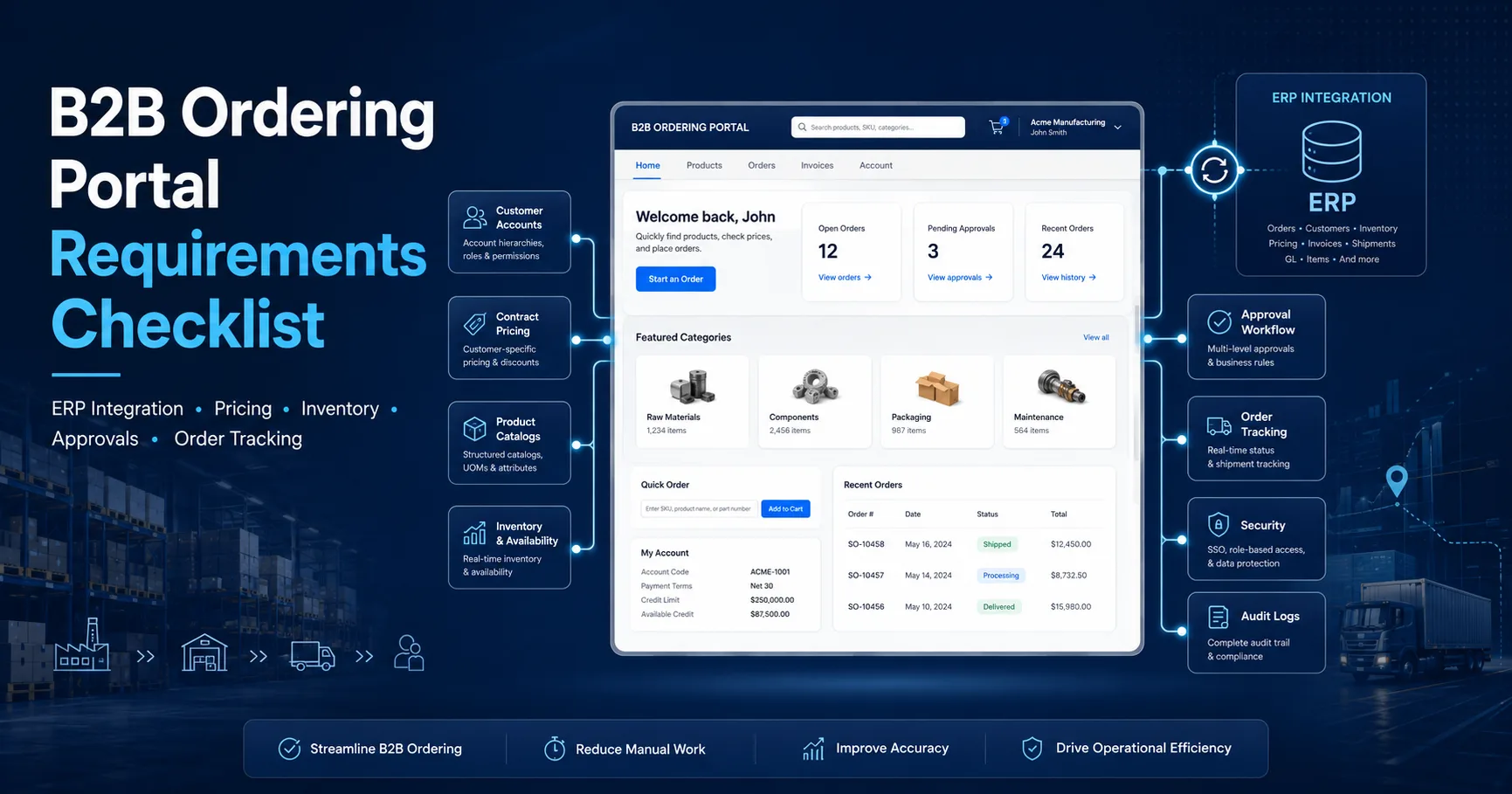
The fastest way to sabotage a B2B portal is to ship features without defining ownership boundaries. Customers don’t care where logic lives. They care that the portal is consistent with ERP outcomes. Treat scope as a contract: the portal is a self-service interface, ERP is the execution engine.
| Domain | System of record | Portal responsibility | Risk if mis-owned |
|---|---|---|---|
| Contract pricing | ERP / Pricing engine | Display + validate + explain price breakdown | Disputes, margin leakage |
| Availability (ATP) | ERP / Inventory service | Show promise dates with caveats and re-check at submit | Backorders, escalations |
| Order placement | ERP (final commit) | Draft, validation, idempotent submit, customer confirmation | Duplicate orders, credit holds |
| Order status & tracking | ERP / WMS / TMS | Unified timeline across partial shipments, invoices | “Where is my order?” tickets |
Strategic scope for fast adoption: reorder from history, saved carts, purchase approvals, order tracking, invoice retrieval, and exception transparency (credit hold, substitutions, partials). Anything that reduces email loops becomes an immediate ROI lever.
In B2B, pricing is not “a price.” It’s a contract: customer tier, item agreements, date ranges, currency, discounts, and sometimes special freight rules. The portal must show a price the customer recognizes—and the ERP must confirm that same price at submit. That’s the difference between a scalable portal and a support-heavy portal.
Use a hybrid strategy: sync contract tables on schedule/event (daily + changes), then validate cart totals against ERP at order submit. Customers get fast browsing; finance gets correctness.
Long-tail queries you’ll win with this section: “contract pricing sync portal ERP”, “customer-specific pricing API for B2B”, “avoid pricing disputes in self-service portal”.
Tie this into your pricing product narrative: /pricing-and-quoting.
Availability is a commercial promise. ATP (Available-to-Promise) is not “on-hand.” It must consider allocations, inbound supply, lead times, cut-off windows, and warehouse constraints. If you want fewer backorder disputes, treat ATP as a product capability—not a database query.
| Signal | What the portal should display | Where it’s computed |
|---|---|---|
| On-hand | “In stock” hint (not a promise) | Inventory ledger / WMS |
| Allocated | Hidden from customer; affects promise | ERP allocation engine |
| ATP date | “Available by: YYYY-MM-DD” | ERP availability service |
| Lead time | Fallback estimate (with disclaimer) | Item master / procurement |
Inventory foundations should align with /inventory-control.
Order placement is where portals earn credibility. Customers don’t tolerate duplicate orders, silent failures, or “submitted but missing.” Make the submit path retry-safe, with predictable errors and a clear “accepted vs rejected” contract.
For conversion: make checkout a “confidence moment.” If you show why something failed and offer a resolution option, customers complete orders instead of emailing sales ops.
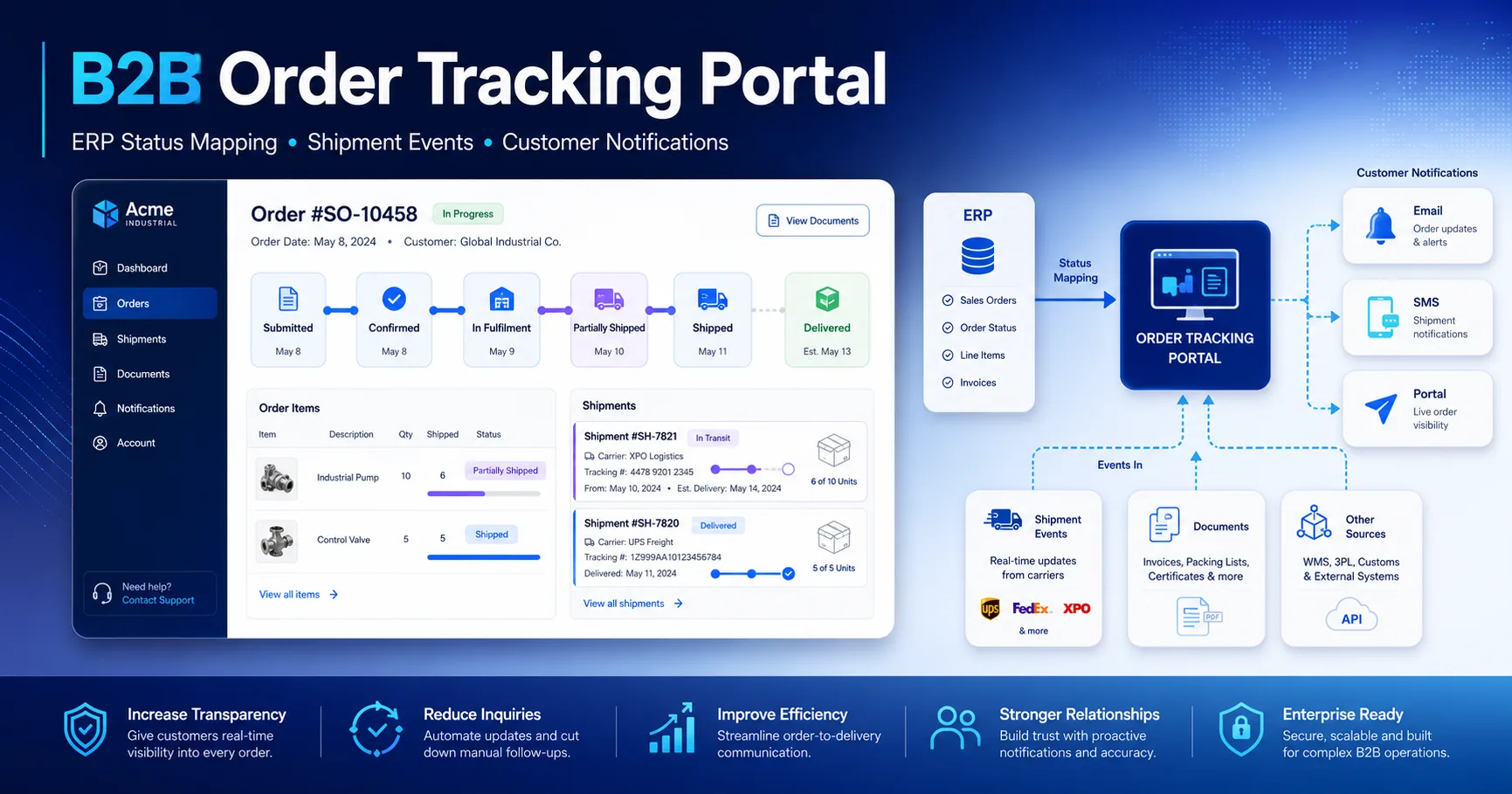
“Order status” isn’t a single field. B2B needs partials, backorders, shipment splits, carrier tracking, and invoice milestones. The portal should present one coherent timeline even when ERP, WMS, and TMS each own part of the truth.
| Customer-facing status | ERP/WMS reality | Portal expectation |
|---|---|---|
| Confirmed | Order accepted, validations passed | Stable reference number + ETA range |
| In fulfillment | Picking/packing, allocation confirmed | Line-level progress (partial ready) |
| Partially shipped | Multiple shipments created | Tracking numbers per shipment |
| Completed | All lines shipped/invoiced | Invoices available + proof of delivery (if any) |
Implementation note: if you can publish status events, use them. If not, poll with clear SLOs. Either way, keep status semantics stable—customers learn your language, and stability reduces tickets.
Once customers trust order tracking, the next “high leverage” self-service layer is invoices and credits: invoice visibility, downloadable documents, payment status hints, and credit memo transparency. This reduces AR back-and-forth and speeds up reorders.
Pricing-to-invoice alignment should mirror your quoting and pricing strategy: /pricing-and-quoting.
Exceptions are where B2B portals either become “nice-to-have” or mission-critical. The goal is not to eliminate exceptions. The goal is to make them visible, actionable, and auditable—with clear next steps for both customer and internal teams.
Enterprise reality: customers accept exceptions when they are explicit and time-bound. They escalate when exceptions are silent, ambiguous, or require back-and-forth.
An enterprise portal needs an audit-grade timeline for every order: pricing snapshot, ATP checks, customer confirmations, ERP acknowledgements, shipment events, invoice postings, credits, and exceptions. This is not just compliance—it’s operational efficiency. When support can answer “why” with evidence, you reduce churn and speed up future orders.
Contract/tier/discount basis stored + versioned. Customer sees the same breakdown.
correlation_id included
Promise date and constraints recorded (warehouse, cut-off time, partial policy).
ERP order number + acceptance timestamp stored. Idempotency prevents duplicates.
Partial shipments recorded per package with carrier tracking.
Documents linked to order lines; exceptions resolved with reason codes.
Operational KPI: “time to answer ‘what happened?’” should be minutes, not days. The portal becomes a retention channel when it removes friction from every reorder.
Position this capability alongside: /b2b-order-portal, /inventory-control, /pricing-and-quoting.
If your portal drives repeat orders, your integration architecture becomes revenue infrastructure. A clean contract pricing sync, ATP strategy, and an ERP order status API with auditability will reduce support load and increase reorder velocity.
Continue reading with these related articles on CRM, ERP, and API integrations.
Integration Observability for CRM/ERP
How to make integrations debuggable: correlation IDs, structured logs, metrics, tracing, alerting, and SLOs—so failures...
Read more
Change Data Capture for CRM–ERP Integrations
A practical blueprint to choose CDC, webhooks, or polling for CRM–ERP sync—latency, reliability, data correctness, and o...
Read moreGet a practical scope direction and integration roadmap for your CRM, ERP, or API project.
Typical response within 24 hours · Clear scope & timeline · Documentation included