Tuğrul Yıldırım
By Tuğrul Yıldırım

RFQ Workflow Automation for Manufacturing

RFQ Workflow Automation for Manufacturing

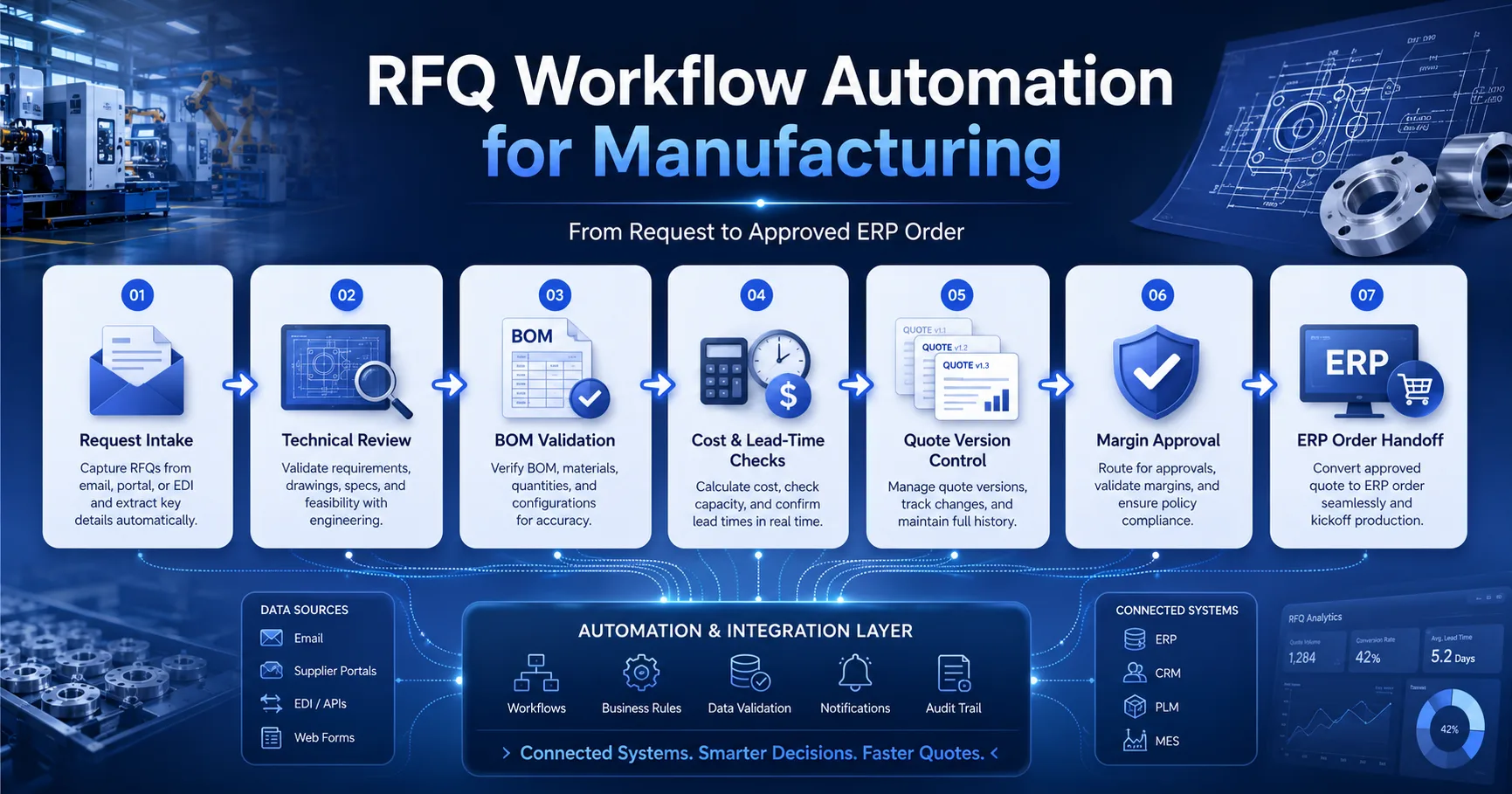
Automate manufacturing RFQ workflows from intake and technical review through quote revisions, margin approval and ERP-ready order handoff.

RFQ Workflow Automation for Manufacturing

Executive brief

A manufacturing RFQ workflow is not simply a form followed by a PDF quote. It is a controlled decision process connecting customer demand, technical feasibility, BOM validation, cost, capacity, lead time, margin approval, customer revisions and ERP-ready order creation.

When those decisions are scattered across email, spreadsheets and verbal approvals, quote turnaround slows down and commercial risk becomes difficult to measure. RFQ automation gives every request a visible owner, state, deadline, revision history and approval path.

  • Capture complete commercial and technical requirements before costing begins.
  • Route BOM, drawing, material and production questions to the correct reviewers.
  • Combine price, lead-time and availability inputs into one controlled quote version.
  • Protect margin through threshold-based discount and exception approvals.
  • Convert only an accepted quote revision into an ERP-ready order payload.

For the commercial workflow overview, visit Manufacturing RFQ Management . For pricing rules, quote versioning and margin controls, review Pricing & Quoting .
What an RFQ Workflow Includes

A manufacturing RFQ usually passes through several teams before it becomes a commercially safe offer. Sales understands the opportunity, engineering checks feasibility, procurement verifies external inputs, production evaluates capacity, finance protects margin and operations confirms that an accepted quote can become an executable order.

A structured RFQ management workflow turns those handoffs into explicit states. Each state should have an owner, entry criteria, completion criteria, due date and escalation rule.

Recommended RFQ-to-order state model

  1. 1

    Request received

    Customer request, quantities, drawings, target date and commercial context are captured.

  2. 2

    Qualified

    Commercial fit, customer identity, scope completeness and response deadline are confirmed.

  3. 3

    Technical review

    BOM, drawing revisions, specifications, tolerances and manufacturing feasibility are reviewed.

  4. 4

    Cost and lead-time review

    Materials, routing, supplier inputs, capacity, availability and risk allowances are calculated.

  5. 5

    Quote draft

    Price, quantities, lead times, assumptions, validity and commercial terms are assembled.

  6. 6

    Approval required

    Margin, discount, unusual terms or delivery risks are routed to authorized approvers.

  7. 7

    Customer review

    The customer accepts, rejects or requests a controlled quote revision.

  8. 8

    Approved order handoff

    The accepted revision is converted into a validated CRM or ERP order payload.

Workflow area Primary owner Required evidence
Commercial qualification Sales or account management Customer, opportunity, scope, deadline and expected value
Technical feasibility Engineering Approved drawings, BOM, specification and assumptions
Cost and supply Costing, procurement and planning Cost basis, supplier validity, availability and lead time
Commercial approval Sales management or finance Margin, discount, reason code and approver decision
Order handoff Sales operations or integration service Accepted quote version and validated ERP payload

RFQ Intake and Qualification

RFQ automation begins with structured intake. If required information is missing, the workflow should identify the gap before engineering or costing teams spend time on an incomplete request.

The intake model should support requests received through sales representatives, customer portals, email parsing, API integrations or manual entry while producing the same internal RFQ structure.

Commercial intake fields

  • Customer account, contact and ship-to market
  • Opportunity, project or tender reference
  • Requested response deadline
  • Expected order date and delivery window
  • Currency and target commercial terms
  • Requested quantity and quantity breaks
  • Customer target price, when provided
  • Incoterms, freight and packaging expectations
  • Probability, strategic value and competitive context

Technical intake fields

  • Customer item code and internal item match
  • Drawing number and drawing revision
  • BOM, specification and material requirements
  • Dimensions, tolerances and quality standards
  • Certification and inspection requirements
  • Tooling, prototype or sample requirements
  • Packaging and labelling specifications
  • Attachments, images and supporting documents
  • Known substitutions or approved alternatives
Qualification question Qualified outcome Unqualified outcome
Is the customer and commercial opportunity valid? Continue to technical review Reject, archive or request account clarification
Is the requested scope sufficiently complete? Create review tasks Return to sales or customer for missing information
Is the response deadline achievable? Set team-level due dates Negotiate a new deadline or decline
Does the opportunity meet strategic or value criteria? Assign normal or priority route Apply fast-no-bid decision with reason
Is an existing product or quote reusable? Start from approved baseline Create new technical and costing review

Qualification should be fast. The purpose is not to create bureaucracy. It is to stop incomplete, low-value or technically impossible requests from consuming the same resources as qualified opportunities.

Technical Review and BOM Validation

Manufacturing quotes are only commercially useful when the technical basis is clear. A technically incomplete quote may win the opportunity but create margin loss, delivery failure or disputes after order acceptance.

The technical stage should establish a controlled baseline for what is being priced. Drawings, BOMs, routing assumptions and exceptions should belong to the RFQ revision—not remain as disconnected email attachments.

Product match

Determine whether the request uses an existing product, configurable product, modified item or completely new engineered item.

BOM validation

Confirm components, quantities, alternates, scrap assumptions and effective revisions.

Routing validation

Validate operations, machine groups, setup time, labour time, subcontract work and inspection steps.

Drawing control

Record the drawing number, revision, received date and approval status used for costing.

Quality requirements

Capture test, inspection, certification, traceability and documentation requirements.

Technical risk

Identify assumptions, unresolved questions, tooling risk, prototype needs and customer dependencies.

Technical review completion checklist

The workflow should prevent quote release when mandatory technical reviews remain incomplete. An authorized exception may be allowed, but it should require a reason, owner and visible risk note.

Cost, Lead-Time and Availability Checks

Cost and lead time are produced from multiple inputs. Material costs may come from ERP, supplier quotations or indexed agreements. Capacity may come from planning. Existing stock may reduce lead time but should not automatically be treated as available for a future order.

Manufacturing RFQ software should preserve the source, date and confidence of every critical input. A price calculated from a six-month-old supplier quote should not appear as reliable as a current contracted cost.

Input Possible source Validation requirement Quote impact
Material cost ERP, supplier quote or price agreement Effective date, currency and minimum quantity Unit price and validity risk
Labour and machine rate ERP costing or approved rate table Rate version and production centre Conversion cost
Subcontract operation Supplier RFQ or contract Scope, freight and validity Cost and external dependency
Scrap and yield Routing, historical data or engineering Product and process relevance Material and production risk
Available stock ERP or inventory service Allocation and freshness check Initial lead-time scenario
Production capacity Planning or scheduling system Requested date and load horizon Promise date and overtime risk
Tooling or setup Engineering or prior quote history Reusable, new or customer-owned tooling One-time charge and launch lead time
High confidence

Current ERP rates, valid supplier agreements, confirmed capacity and approved technical baseline.

Medium confidence

Recent historical costs or planning estimates requiring quote assumptions and shorter validity.

Low confidence

Missing supplier confirmation, unresolved design or uncertain material and capacity assumptions.

Cost and lead-time inputs should be frozen into each quote revision. Recalculating an old revision using current rates destroys the evidence needed to explain how the original commercial decision was made.

Quote Creation and Version Control

Quote revisions should be immutable commercial snapshots. When quantities, specifications, lead times, prices or terms change, the workflow should create a new version rather than silently rewriting the version that was already reviewed or sent.

This allows sales, finance and operations to answer a critical question: Which exact version did the customer accept?

Quote header requirements

  • RFQ and opportunity reference
  • Quote number and revision number
  • Customer, contact and commercial scope
  • Currency, tax basis and payment terms
  • Quote date, expiration date and price validity
  • Delivery terms and estimated lead time
  • Commercial assumptions and exclusions
  • Approval status and latest approved revision

Quote line requirements

  • Customer item and internal item reference
  • Description and technical revision
  • Quantity or quantity-break scenario
  • Unit of measure and pack quantity
  • Unit price, discount and net amount
  • Cost basis and calculated margin
  • Line-specific lead time and availability
  • Tooling, freight or one-time charges
Event Version behaviour Approval impact
Internal wording correction Minor revision or controlled amendment No reapproval if commercial meaning is unchanged
Quantity changes Create a new revision and recalculate Reapproval if margin or thresholds change
Price or discount changes Create a new commercial revision Approval based on new margin
Drawing or BOM revision changes Create a new technical and commercial revision Repeat affected technical and cost reviews
Lead-time or term changes Create a revised offer Route only if policy requires approval

Quote templates, pricing rules and revision controls should align with the wider Pricing & Quoting workflow so RFQ automation does not create a second, conflicting pricing model.

Margin and Discount Approval Matrix

Approval automation should route genuine exceptions without forcing every normal quote through management. The matrix should consider margin, discount, quote value, commercial terms, delivery risk and strategic context.

Condition Example route Required context SLA
Within standard margin and discount policy Automatic approval Validated technical and cost basis Immediate
Moderate discount exception Sales manager Reason code, customer value and competitive context Same business day
Margin below business threshold Sales director or finance Margin bridge, recovery plan and strategic justification Defined escalation window
Non-standard payment or liability terms Finance, legal or commercial director Requested clause, exposure and proposed mitigation Policy-based
High technical or delivery risk Engineering and operations leadership Risk statement, assumptions and contingency Before customer release

Approval request should include

  • Quote revision and customer opportunity
  • Revenue, cost and gross margin
  • Standard price versus proposed price
  • Discount amount and percentage
  • Previous approved or won price
  • Reason code and sales justification
  • Technical and delivery risk indicators
  • Approval deadline and customer deadline

Approval history should retain

  • Approver identity and role
  • Approval, rejection or request-for-change result
  • Decision timestamp
  • Reason and comments
  • Approved margin or discount limit
  • Conditions attached to approval
  • Delegation or escalation path
  • Quote revision covered by the decision

Approval should expire when the commercial basis changes. An approval given for one quantity, cost basis or quote revision should not automatically authorize a materially different customer offer.

Customer Revisions

Customers frequently change quantities, specifications, delivery dates or commercial expectations after receiving a quote. A controlled revision workflow should identify what changed and repeat only the reviews affected by that change.

Customer change Required review Likely approval impact
Quantity change Cost, capacity, availability and pricing Reapproval if margin or discount changes
Drawing or specification change Engineering, BOM, routing and costing Full affected-scope reapproval
Requested delivery date change Planning, procurement and logistics Approval if overtime or premium freight is required
Target price request Pricing and margin review Approval based on discount threshold
Term or warranty change Finance, commercial or legal review Policy-based approval

Recommended customer revision flow

  1. Step 1

    Record the requested change

    Capture customer wording, attachments, requester and timestamp.

  2. Step 2

    Create a revision comparison

    Highlight changed lines, quantities, technical fields, dates and terms.

  3. Step 3

    Reopen affected tasks

    Route only the changed technical, costing, planning or approval areas.

  4. Step 4

    Release the new version

    Preserve all older versions and send only the approved replacement revision.

The full Quote-to-Cash workflow should treat the accepted quote revision as the commercial baseline for order, delivery and invoice visibility.

ERP Order Handoff

The final step of an RFQ-to-order workflow should not rely on someone retyping an accepted quote into the ERP. Manual re-entry introduces item, quantity, price, date and revision errors precisely when the process should become more controlled.

Only the accepted and fully approved quote revision should be eligible for order conversion. The handoff contract should separate commercial intent from ERP execution and return a durable ERP order reference.

Payload area Required data Validation owner
Customer ERP account, bill-to, ship-to and contact references CRM–ERP account mapping
Order header Customer PO, currency, terms, requested date and quote reference Sales operations
Order lines ERP item, description, quantity, unit, price and delivery date Integration contract and ERP validation
Technical references Drawing, BOM or configuration revision Engineering baseline
Commercial evidence Quote version, approvals, discount and accepted terms Pricing and approval workflow
Integration controls External reference, idempotency key and correlation ID Integration layer

Recommended quote-to-order handoff

  1. 1

    Freeze the accepted quote revision

    Prevent further commercial edits after customer acceptance.

  2. 2

    Validate mappings and mandatory fields

    Resolve customer, item, unit, address, tax, term and technical references.

  3. 3

    Submit a retry-safe order command

    Use a stable idempotency key so timeouts and retries cannot create duplicate ERP orders.

  4. 4

    Store the ERP acknowledgement

    Record the ERP order number, creation time, response and correlation identifier.

  5. 5

    Start order execution visibility

    Link the RFQ, accepted quote and ERP order so teams retain end-to-end commercial context.

Handoff failure handling

  • Distinguish validation errors from temporary ERP failures.
  • Show errors using stable, actionable reason codes.
  • Retry only transient errors.
  • Send non-retriable failures to an exception queue.
  • Preserve the approved quote while the handoff is repaired.
  • Prevent manual and automated duplicate creation.

System ownership

  • CRM or RFQ system owns request and quote history.
  • Pricing workflow owns approved commercial logic.
  • ERP owns executable order and fulfilment records.
  • Integration layer owns mapping and delivery reliability.
  • Audit history links all identifiers and transitions.
  • Changes after order creation follow controlled order-change rules.

Review the wider CRM–ERP Integration model when customer, product and address ownership must be resolved before order conversion.

RFQ Workflow KPIs

RFQ automation should improve commercial speed without hiding technical or margin risk. The most useful KPIs measure flow time, conversion, bottlenecks, revision quality and profitability.

KPI What it measures Why it matters
RFQ response time Received to first customer-ready quote Measures overall commercial speed
Qualification time Received to qualified or no-bid decision Shows intake efficiency
Technical review cycle time Qualified to technical approval Identifies engineering bottlenecks
Approval turnaround Approval requested to decision Shows whether governance slows sales
Revision count Average revisions before acceptance or loss Indicates intake and quote quality
Quote win rate Won RFQs divided by decided RFQs Measures commercial effectiveness
Quoted vs realized margin Expected margin compared with actual order margin Tests costing and pricing quality
Order handoff failure rate Failed ERP conversions divided by accepted quotes Measures integration readiness

Speed

Median response time

Track median and percentile performance, not only averages.

Quality

First-pass completeness

Percentage of requests that enter review without missing mandatory data.

Governance

Approval SLA compliance

Percentage of approval decisions completed inside policy.

Profitability

Margin variance

Difference between quoted and realized margin after execution.

Implementation Roadmap

Do not begin by automating every exception. Start with a clear state model, mandatory data, quote revision rules and one reliable order handoff. Expand after the baseline process produces measurable and trustworthy data.

  • Map current RFQ states, handoffs and delay points.
  • Define roles, ownership and approval authority.
  • Separate customer RFQs from supplier RFQs.
  • Document system-of-record boundaries.
  • Agree MVP states and acceptance criteria.

Need a build-ready RFQ automation blueprint?

I can map your intake, engineering review, costing, approval and ERP handoff into a practical workflow specification with roles, states, contracts and acceptance criteria.

FAQ

An RFQ workflow is the controlled process used to receive, qualify, technically review, cost, approve, revise and convert a customer request for quotation into an accepted quote and executable order.

Turn RFQs into approved, executable orders

A controlled RFQ workflow reduces quote delays, protects margin and preserves the technical and commercial context required for reliable ERP execution.

Share this article

Related Articles

Continue reading with these related articles on CRM, ERP, and API integrations.

Need help implementing these insights?

Get a practical scope direction and integration roadmap for your CRM, ERP, or API project.

Typical response within 24 hours · Clear scope & timeline · Documentation included