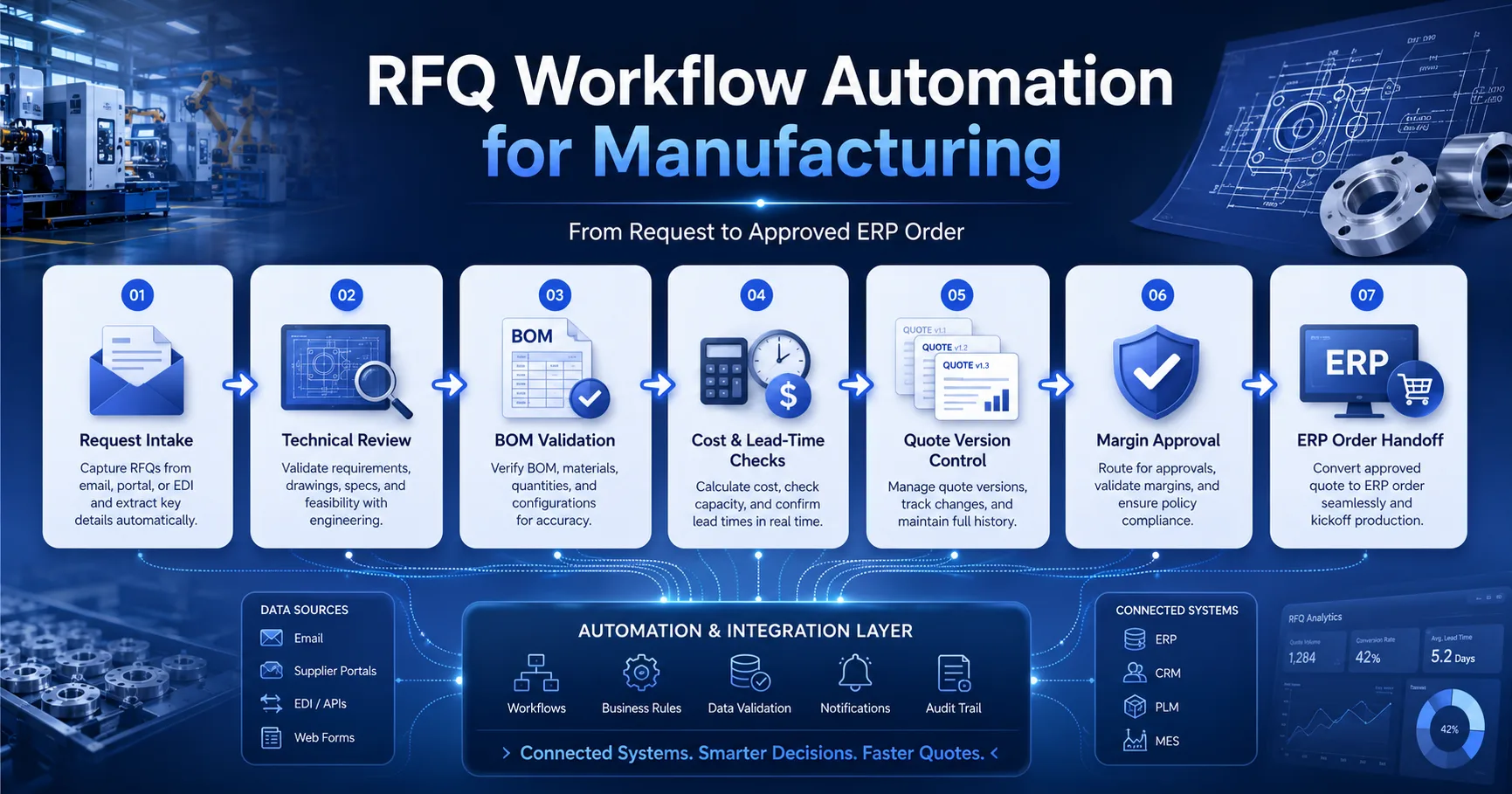
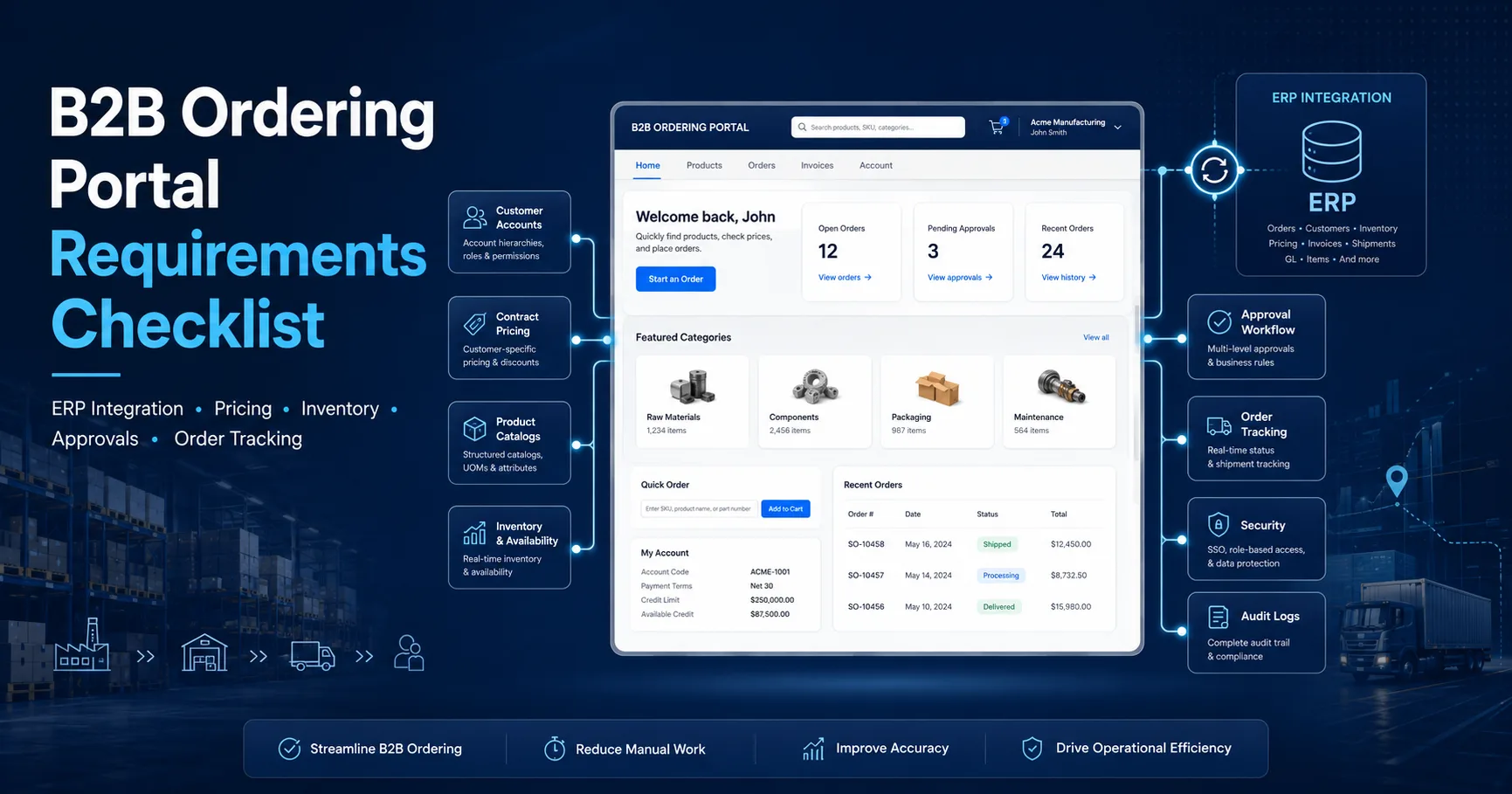
Design a B2B order tracking portal with customer-facing status mapping, shipment events, notifications, documents and exception handling.
Executive brief
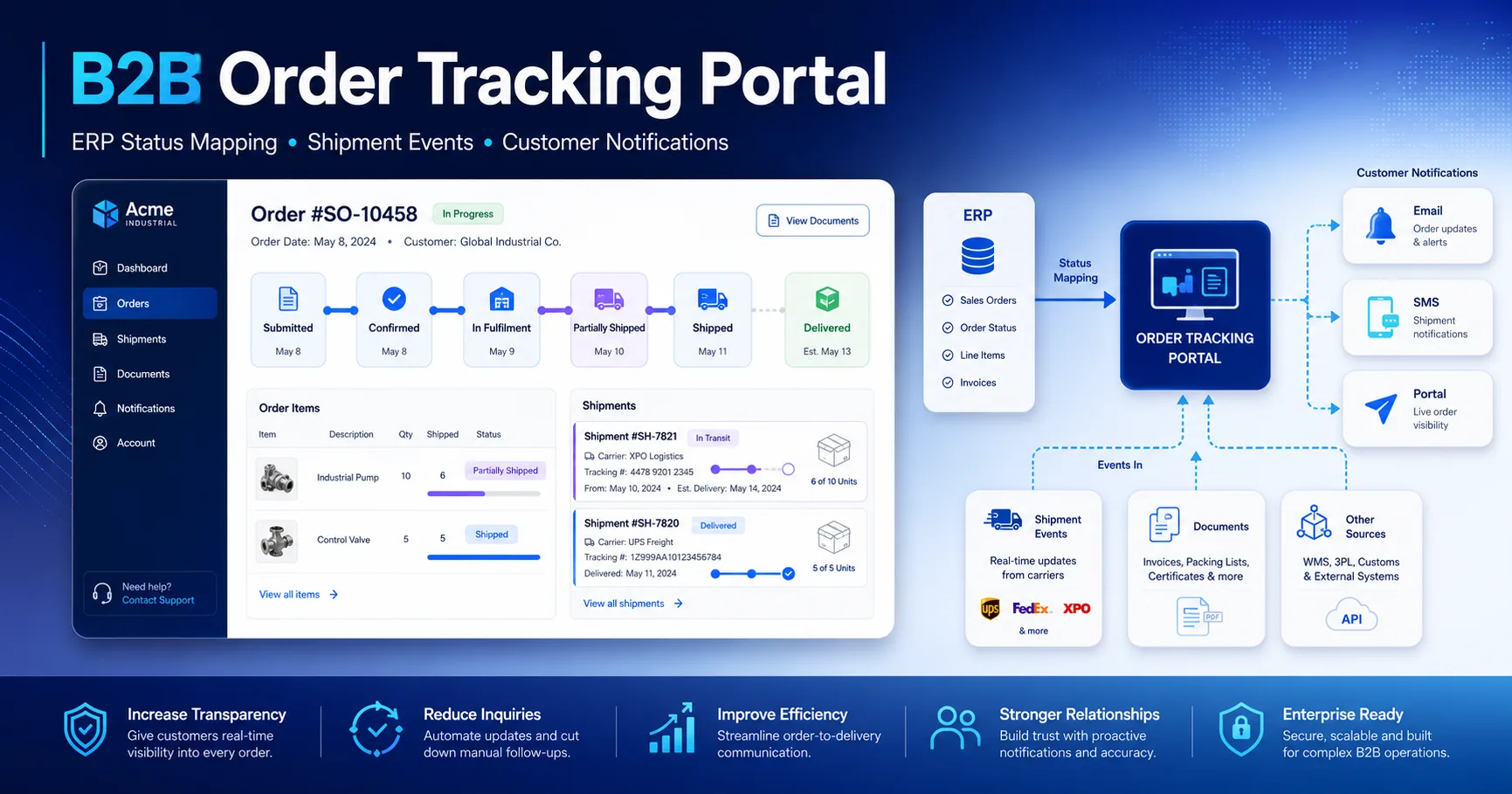
A reliable B2B order tracking portal should not copy raw ERP codes onto a customer dashboard.
It should translate orders, allocations, warehouse activities, shipments, invoices and exceptions into a
clear customer-facing timeline.
The architecture must answer three questions without forcing the customer to contact sales operations:
Has my order been accepted?What has shipped?Is any action required from me?
Separate internal ERP workflow states from customer-facing order states.
Track fulfilment at order, line, shipment and document level.
Normalize carrier events before displaying them to customers.
Support partial shipments, backorders, holds and revised promise dates.
Show freshness timestamps and safe fallback messages during ERP outages.
ERP status codes are designed for internal operations, accounting, warehouse control and exception management.
They are rarely written as customer communication. A code such as
CREDIT_BLOCK,
DELIVERY_CREATED or
GOODS_ISSUE_PENDING
may be meaningful internally but confusing or unnecessarily alarming to a buyer.
An effective B2B order status portal adds a translation layer between operational truth
and customer communication. The portal should preserve the detailed ERP event for audit and support while exposing
a simpler state, explanation and next action to the customer.
Problem 01
Internal codes are unstable
ERP customizations, workflows and upgrades can change codes without changing the customer journey.
Exposing them directly couples the portal UI to internal implementation details.
Problem 02
One order has multiple truths
The order header, individual lines, warehouse deliveries, carrier shipments and invoices may each have
different states at the same time.
Problem 03
Raw reasons may expose sensitive data
Credit, margin, fraud, procurement or internal capacity reasons may require controlled wording rather than
direct exposure to every portal user.
Internal signal
Poor customer presentation
Recommended customer message
ORDER_CREATED
Sales document created
Your order has been accepted.
CREDIT_BLOCK
Credit blocked
Your order is under review. We will update you when processing resumes.
DELIVERY_PARTIAL
Partial delivery document
Part of your order is ready to ship. Remaining items are shown below.
POD_CONFIRMED
Proof-of-delivery posted
Shipment delivered.
Architecture rule:
keep the original ERP code, source timestamp and source document reference.
Map them to a stable portal status, customer message, severity and permitted actions.
Internal vs Customer-Facing Order States
The portal should maintain a customer-facing state machine that is stable even when the ERP, warehouse or carrier
uses a different set of internal statuses. This creates a dependable language customers can learn and support teams
can explain.
The state model should be simple enough for customers but detailed enough to distinguish
accepted, in fulfilment, partially shipped,
action required and completed.
01 · Submitted
Order received by the portal
The customer completed submission, but final ERP acceptance may still be pending.
02 · Confirmed
ERP accepted the order
The portal has an ERP order reference and the order is eligible for fulfilment.
03 · In fulfilment
Allocation, picking or production started
Some lines may be ready while others are awaiting stock, production or warehouse processing.
04 · Partially shipped
At least one shipment has left
The portal should show shipped lines, remaining quantities, tracking references and updated promise dates.
05 · Shipped
All shippable lines dispatched
Carrier events, estimated delivery and shipment documents become the primary customer view.
06 · Completed
Fulfilment and final documents completed
The order is delivered or operationally closed, with invoices and related documents available.
Action required
Use this state when the customer can resolve the issue, such as approving a price change,
correcting a purchase reference or selecting an alternative delivery option.
Under review
Use this state when internal teams are handling an exception and the buyer does not need to take immediate action.
ERP Status Mapping Table
A status mapping table is the central contract of an
ERP order tracking system portal. It should define not only the visible state,
but also precedence, customer wording, notification behaviour and whether an action is available.
ERP or source event
Portal status
Customer message
Notify?
Customer action
PORTAL_SUBMITTED
Submitted
We received your order and are sending it for processing.
Yes
View submitted order
ERP_ORDER_CREATED
Confirmed
Your order has been accepted.
Yes
Download confirmation
ORDER_REVIEW
Under review
Your order is being reviewed. No action is currently required.
Only if delayed
Contact support
CUSTOMER_INPUT_REQUIRED
Action required
We need additional information before processing can continue.
Yes, high priority
Review and respond
ALLOCATED / PICKING_STARTED
In fulfilment
Your order is being prepared.
Optional
View line progress
PARTIAL_GOODS_ISSUE
Partially shipped
Part of your order has shipped. Remaining items are still being processed.
Yes
Track shipment
GOODS_ISSUED
Shipped
Your order has shipped.
Yes
View carrier tracking
DELIVERED / POD_CONFIRMED
Delivered
Your shipment has been delivered.
Yes
View proof of delivery
ORDER_CLOSED
Completed
This order is complete.
No
Reorder
ORDER_CANCELLED
Cancelled
This order has been cancelled.
Yes
View reason or contact support
Do not calculate the visible state from one field alone.
The mapping may need to combine order header status, line fulfilment, delivery documents,
shipment events, cancellation flags and invoice state.
Shipment and Carrier Events
Shipment tracking usually crosses several systems. The ERP may create the delivery, the warehouse system confirms
picking and packing, the transport platform creates a consignment, and the carrier provides movement and delivery events.
The portal should combine these into one shipment timeline.
A strong shipment status integration stores carrier-specific event codes but translates them into
a normalized set of shipment states that remains consistent across carriers.
Recommended normalized shipment states
1Preparing: delivery or package created but not yet handed to the carrier.
2Dispatched: shipment left the warehouse or was accepted by the carrier.
3In transit: shipment is moving through the carrier network.
4Delivery exception: shipment requires attention or has experienced a delay.
5Delivered: delivery confirmation or proof of delivery is available.
Shipment data the portal should store
ERP delivery or shipment document number
Carrier and carrier service
Tracking number and secure tracking URL
Shipment creation, dispatch and delivery timestamps
Package or pallet identifiers
Order lines and quantities included in the shipment
Estimated delivery date and latest carrier update
Delivery exception code and customer-safe explanation
Proof-of-delivery document reference
Source event
Normalized event
Portal behaviour
Label created
Preparing
Show tracking reference but do not claim the shipment is in transit.
Carrier pickup scan
Dispatched
Start shipment tracking and send dispatch notification.
Hub or depot scan
In transit
Update the timeline without notifying on every scan.
Delay or address exception
Delivery exception
Show next action and notify only when customer involvement is useful.
Proof of delivery
Delivered
Show delivery timestamp and permitted proof-of-delivery document.
Carrier webhooks and ERP events may be delivered more than once or arrive out of order.
Store a stable source event ID, event timestamp and precedence rule so duplicate or late events cannot move
a delivered shipment back to “in transit.”
Partial Shipments and Backorders
B2B orders frequently split across warehouses, production dates or carrier consignments.
The portal should therefore avoid representing fulfilment as a single status attached only to the order header.
A useful customer order tracking portal models at least four levels:
order, order line, shipment and shipment line. This enables the buyer to understand exactly what has shipped,
what remains open and when the remaining quantity is expected.
Order header
Overall commercial order, customer reference and summary state.
Order line
Ordered, confirmed, allocated, shipped, cancelled and remaining quantity.
Shipment
Carrier, tracking number, dispatch date, ETA and delivery state.
Shipment line
Which order line and quantity are included in each shipment.
Example: partial fulfilment presentation
Product
Ordered
Shipped
Remaining
Current message
Industrial Filter A
100
100
0
Shipped in Shipment 1
Valve Assembly B
50
20
30
20 shipped; 30 expected by the revised date
Seal Kit C
10
0
10
Awaiting availability confirmation
Backorder requirements
Backorder status at line level
Original and revised promise dates
Reason category using customer-safe language
Partial shipment policy
Alternative product or cancellation option
Notification threshold for material delays
Customer actions
Accept revised delivery date
Request a permitted substitute
Cancel the outstanding quantity
Change delivery instructions where allowed
Open a structured support request
Download updated confirmation documents
Customer Notifications
Notifications should reduce uncertainty, not recreate the portal timeline in the customer’s inbox.
Send messages when a meaningful state transition occurs, when a promise changes materially or when the customer
can take an action.
Each notification should include the customer order reference, portal order link, concise status explanation,
affected items or shipment and the next action. Sensitive internal details should remain inside authorized portal views.
Event
Priority
Recommended channel
Message objective
ERP order accepted
Standard
Email + portal notification
Confirm the ERP reference and next expected milestone.
Customer action required
High
Email + in-app banner
Explain what is needed and provide a direct action link.
Partial shipment dispatched
Standard
Email + portal timeline
Show shipped and remaining quantities separately.
Promise date materially delayed
High
Email + account notification
Communicate the revised date and available options.
Shipment delivered
Standard
Configurable email
Confirm delivery and link to proof of delivery.
Invoice posted
Role-dependent
Finance notification
Notify authorized finance contacts that the document is available.
Notification governance
Store the source event ID to prevent duplicate sends.
Notify only after the state transition is committed.
Respect account and user notification preferences.
Separate operational, financial and marketing messages.
Record delivery status and notification history.
Provide secure portal links instead of sensitive payloads.
Avoid notification fatigue
Do not email for every warehouse or carrier scan.
Group several line updates into one meaningful summary.
Use urgency only for genuine customer impact.
Suppress repeated messages during automatic retries.
Allow account administrators to select default preferences.
Keep the portal timeline more detailed than email.
Signed events, idempotent handlers, retries and notification delivery controls should follow the same
integration reliability standards described in
API Integration Services
.
Document and Invoice Visibility
Order status becomes significantly more useful when related documents are accessible in the same portal timeline.
Customers should not need to search separate emails for confirmations, delivery notes, invoices, credit documents
or proof of delivery.
Document
When visible
Typical permission
Order confirmation
After ERP acceptance
Buyer, approver and account administrator
Delivery note
After delivery or shipment posting
Authorized purchasing and receiving users
Invoice
After financial posting
Finance users and permitted account administrators
Credit memo
After credit posting
Finance users with account-level access
Proof of delivery
After carrier confirmation
Buyer, receiving and account administrator
Document integration requirements
Stable relation between order, delivery, shipment and invoice
Document type and lifecycle status
Secure storage or short-lived download URLs
Version and replacement handling
Account and role validation at download time
Download audit history
Customer experience requirements
Group documents under the relevant order or shipment.
Use understandable document labels.
Show issue date, reference and document status.
Explain when a document is not yet available.
Notify only the roles that need the document.
Preserve historical documents according to policy.
ERP Outage and Stale Data Handling
A portal should remain honest when ERP or carrier data is unavailable. Hiding the outage makes the displayed
status look current when it is not. Showing a technical exception page creates unnecessary customer concern.
The correct response is a controlled degraded mode.
Show freshness
Display the last successful ERP or carrier update timestamp near the status timeline.
Preserve safe reads
Continue showing the latest confirmed state and documents when they remain safe to display.
Control risky writes
Queue, pause or convert actions that require immediate ERP validation instead of pretending they succeeded.
Condition
Portal response
Customer message
Short ERP delay
Show cached status and refresh in background
Status last updated at [timestamp]. We are checking for newer information.
ERP unavailable
Read-only timeline with degraded-mode banner
Live ERP updates are temporarily unavailable. Your latest confirmed status remains visible.
Status exceeds freshness SLO
Mark the state as potentially stale and alert operations
This status may be delayed. Our team has been notified.
Carrier feed unavailable
Preserve ERP dispatch state and tracking number
The shipment has been dispatched. Detailed carrier updates are temporarily delayed.
Queued customer action
Store action as pending with an idempotency key
Your request has been received and will be processed when the ERP connection recovers.
Never display “order confirmed,” “cancelled” or “updated” until the authoritative operation has been accepted
or durably queued under an explicit business rule.
Reference Architecture
The recommended architecture separates customer experience, integration processing and source-system ownership.
The portal reads from a customer-safe order timeline model rather than reconstructing the full state directly
from ERP on every page load.
Layer 1
B2B customer portal
Orders, shipments, notifications, documents and customer actions.
Layer 2
Portal API
Authorization, customer scope, read models and action validation.
Layer 3
Integration layer
Mapping, idempotency, queues, retries, status precedence and reconciliation.
Layer 4
ERP / WMS / finance
Orders, lines, allocations, deliveries, invoices and credit documents.
Layer 5
Carrier integrations
Tracking events, ETA, exceptions and proof of delivery.
Recommended event flow
ERP/WMS/Carrier Event
→ Signed Ingress
→ Event Validation
→ Idempotency Check
→ Queue
→ Status Mapping
→ Order Timeline Read Model
→ Notification Decision
→ Portal UI
A B2B order tracking portal is an authenticated customer workspace that presents ERP order acceptance,
fulfilment progress, partial shipments, carrier tracking, invoices, documents and exceptions using
account-scoped, customer-friendly statuses.
ERP codes are designed for internal processing and may be technical, unstable or sensitive.
Mapping them creates a consistent customer journey while preserving the detailed source state for
support, reconciliation and audit purposes.
The portal should show shipped and remaining quantities at order-line level, list each shipment separately,
provide tracking references and display revised promise dates for backordered quantities.
No. Notifications should focus on meaningful milestones, material delays and situations where customer
action is required. Detailed operational scans can remain available in the portal timeline.
It should display the latest confirmed status with a visible freshness timestamp, explain that live updates
are delayed and avoid confirming actions that require immediate ERP acceptance.
Common documents include order confirmations, delivery notes, invoices, credit memos and proof of delivery.
Access should be controlled by account, role and document type.
Replace repetitive status enquiries with reliable self-service visibility
A properly designed order tracking portal gives customers a dependable timeline while protecting
ERP complexity, internal workflow details and sensitive account information.