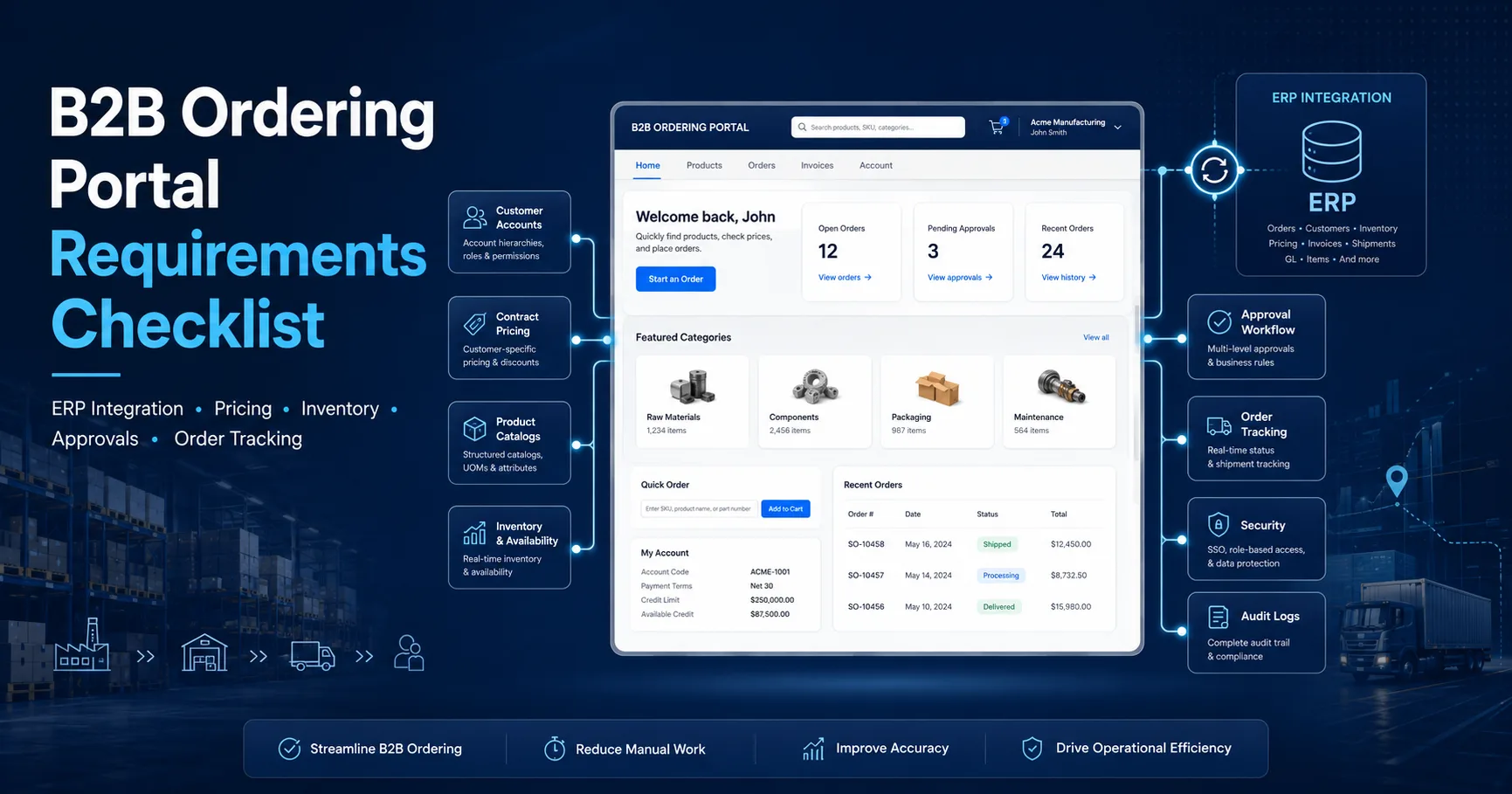
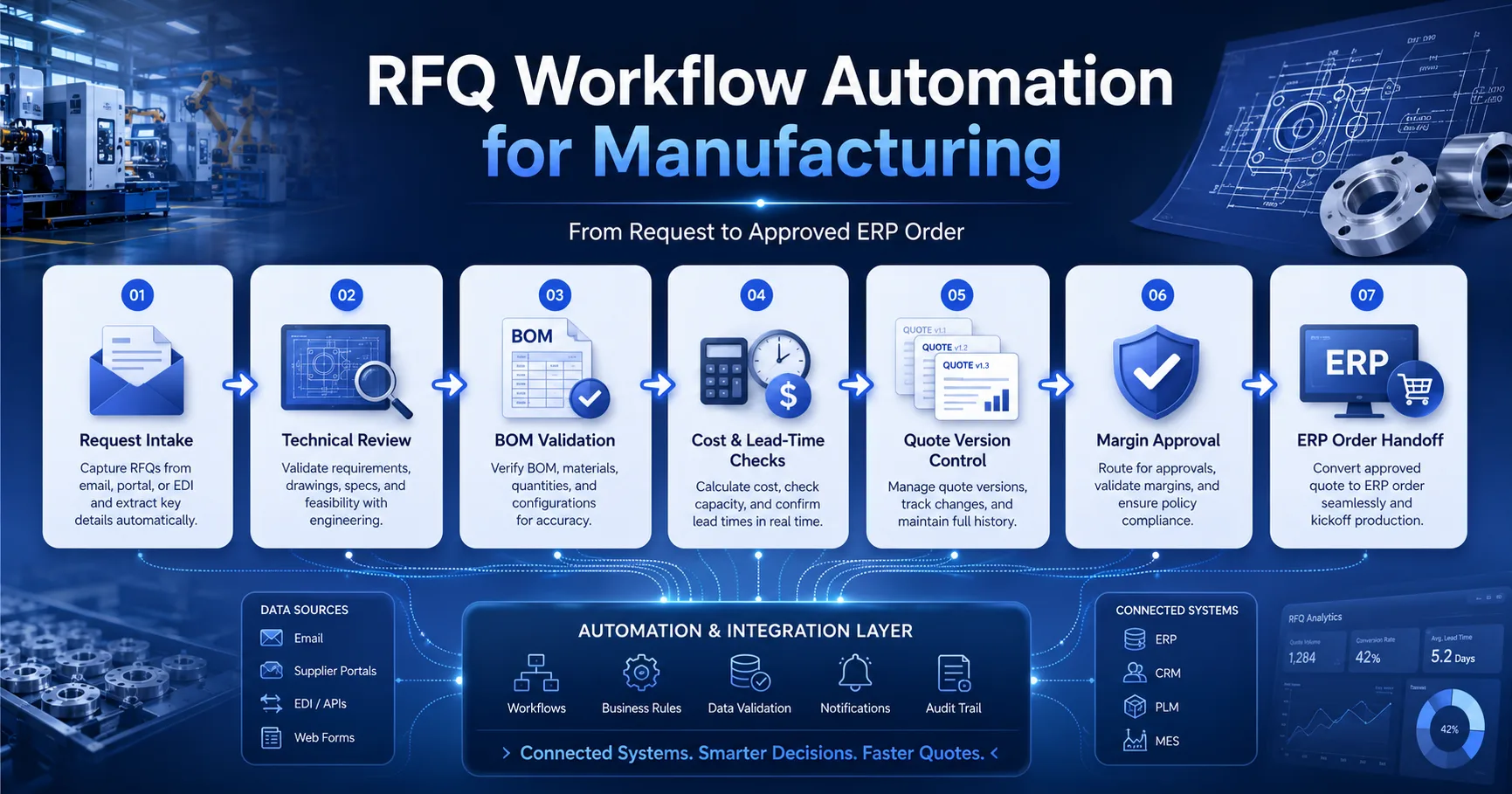
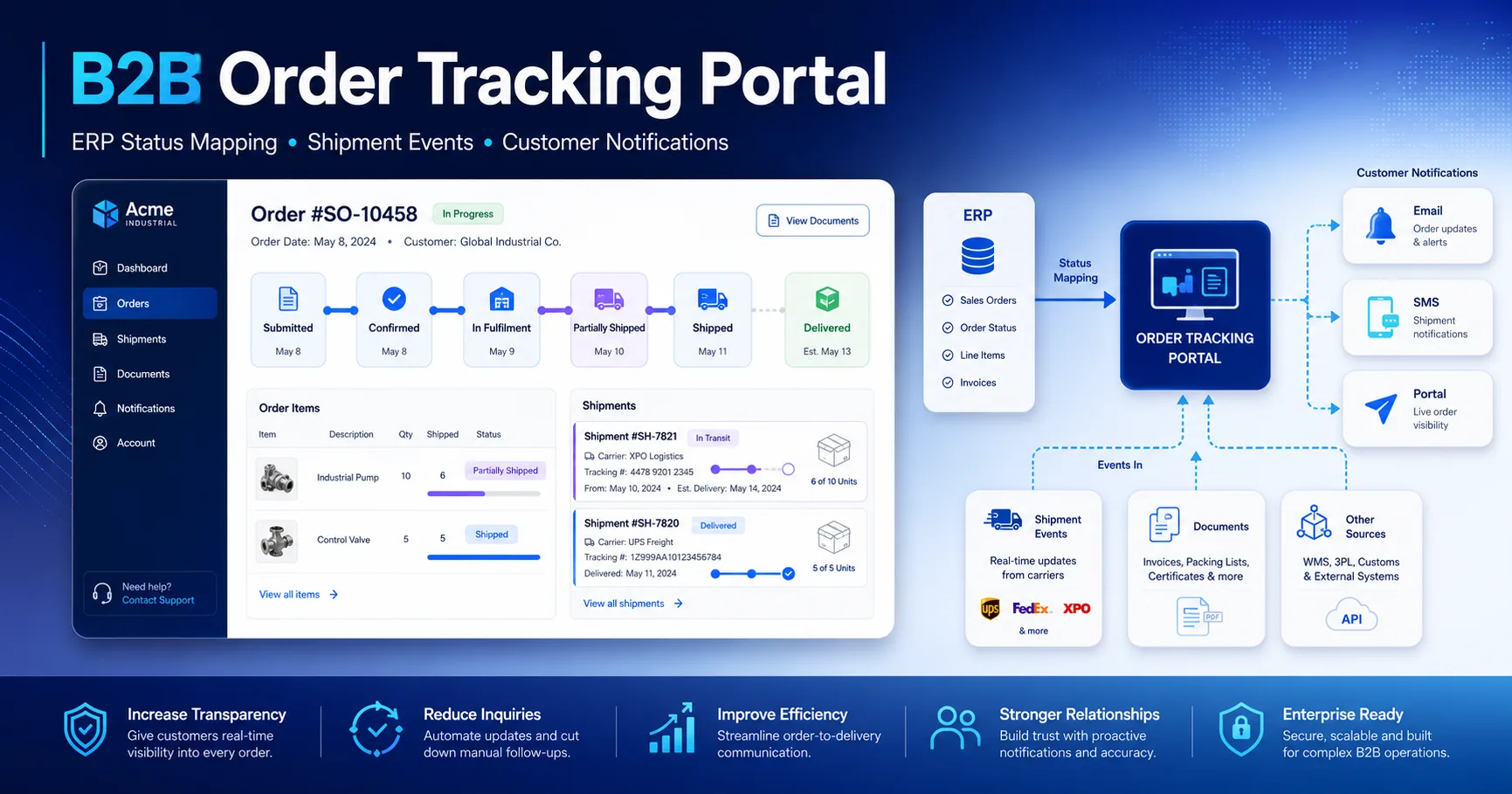
Use this 2026 B2B ordering portal requirements checklist to plan ERP integration, customer pricing, catalogs, approvals, inventory, and order tracking.
Executive brief
A successful B2B ordering portal is not simply an online store with customer login.
It is a controlled purchasing workspace that reflects each account’s products, negotiated pricing,
shipping locations, approval rules, payment terms, inventory signals and ERP order history.
The central design question is not “Which features should the portal have?” It is:
Which decisions can buyers complete without sales or operations manually checking the ERP?
This requirements checklist helps manufacturers and distributors define that scope before development begins.
Model companies, branches, contacts, addresses and buyer permissions correctly.
Show account-specific catalogs and contract pricing without exposing another customer’s data.
Separate indicative stock from reliable available-to-promise information.
Submit orders to ERP through retry-safe, auditable integration contracts.
Give customers useful order, shipment, invoice and exception visibility after checkout.
The core requirements of a self-service B2B ordering portal should be defined around
repeat purchasing, account control and operational transparency. A portal that only displays products
and accepts a cart submission will usually move existing manual problems onto a new screen rather than
eliminating them.
A useful portal should answer the buyer’s most common questions before they need to contact a sales representative:
Which products may I purchase? What is my agreed price? Can you fulfil the requested quantity? Does this order require
internal approval? Has the ERP accepted it? When will it ship? Where is the invoice?
Buyer-facing capabilities
Account-specific product catalog and search
Negotiated pricing, quantity breaks and payment terms
Quick order by SKU, barcode or spreadsheet upload
Saved carts, purchasing lists and reorder from history
Draft orders, approval status and buyer comments
Order, shipment, invoice and credit document visibility
Operational capabilities
ERP-backed customer, pricing, item and order ownership
Customer, branch, ship-to and billing account separation
Role-based access and account-level data isolation
Validation, idempotency and duplicate-order prevention
Integration monitoring, retries and reconciliation
Admin tools for customer access, exceptions and support
Capability
MVP
Phase 2
Business outcome
Customer catalog and pricing
Required
Advanced promotions and bundles
Fewer pricing enquiries and disputes
Availability and lead times
Required
ATP dates and alternatives
Fewer unavailable-item escalations
Draft and submitted orders
Required
Budgets and multi-level approval
Controlled self-service ordering
Order tracking
Required
Shipment and line-level timelines
Fewer “where is my order?” tickets
Document access
Order confirmations
Invoices, credits and delivery notes
Lower administrative workload
Customer and Account Data Model
The data model is the foundation of every dealer ordering portal or distributor portal.
Consumer e-commerce usually assumes one person, one account and one delivery address. B2B purchasing rarely works that way.
A company may have multiple branches, purchasing teams, delivery locations, tax profiles, cost centres and approval limits.
The portal should therefore authorize users within an explicit company context. Permissions, catalog access,
prices, terms and addresses should be resolved from the selected account or branch—not from the user record alone.
Recommended account hierarchy
1
Parent company or dealer group
Holds the legal relationship, master agreement and shared business rules.
Price list, credit status, purchase limits, cost centre, preferred warehouse and order history are attached to the correct scope.
Data object
Typical owner
Portal usage
Control requirement
Customer account
ERP or CRM
Identity and commercial context
Stable external ID
Contacts
CRM or portal identity service
Authentication and permissions
Account-scoped authorization
Ship-to addresses
ERP
Checkout destination selection
Approved-address restrictions
Terms and credit status
ERP or finance system
Order validation and payment options
Read-only finance ownership
Portal roles
Portal
Buyer and approver permissions
Audited role changes
Requirement to confirm before development:
Can one user purchase for multiple branches or companies? If the answer is yes, account context switching,
permission inheritance and order ownership must be designed before the first checkout screen is built.
Contract Pricing and Catalog Rules
Customer-specific pricing is one of the clearest differences between a generic storefront and an
ERP-integrated B2B portal. The price displayed to a buyer may depend on the company,
branch, contract, product group, quantity, currency, date, promotional agreement or sales channel.
The requirements document should define how the final price is resolved and which system is authoritative.
The portal may cache calculated prices for performance, but the final commercial terms should be validated
before order submission.
Pricing rules to document
Base price list and customer-specific agreement precedence
Quantity breaks, pack sizes and minimum order quantities
Contract start and expiration dates
Currency and tax-inclusive or tax-exclusive display rules
Promotions, rebates and non-stackable discounts
Manual override and approval requirements
Rounding rules and unit-of-measure conversions
Catalog rules to document
Which products each account or branch may view
Restricted, discontinued and replacement products
Customer-specific product codes and descriptions
Approved substitutions and equivalent products
Product documents, certificates and technical files
Regional, contractual or compliance-based restrictions
Search synonyms and SKU aliases used by customers
Recommended price resolution sequence
Step 1
Resolve account context
Company, branch, currency, contract and ship-to location.
Step 2
Resolve allowed catalog
Filter products before calculating or exposing prices.
Step 3
Calculate commercial price
Apply agreement, quantity, unit and date-sensitive rules.
Step 4
Revalidate at submit
Return clear differences before the ERP order is created.
The customer should see whether a contract price, quantity discount or standard list price was applied.
Transparent pricing logic increases purchasing confidence and gives support teams evidence when a price changes.
Inventory and Availability Integration
Inventory visibility must be described precisely. “In stock” may refer to physical on-hand quantity,
sellable quantity, unallocated quantity, available-to-promise quantity or a future replenishment date.
These values are not interchangeable.
A reliable B2B order management portal should expose the amount of information buyers need
to make a decision without revealing sensitive operational data or creating a promise the ERP cannot fulfil.
Inventory signal
Meaning
Safe portal presentation
On hand
Physical quantity currently recorded
Do not present as a guaranteed promise
Available
On hand minus reservations or blocked stock
“Available now” with freshness timestamp
ATP
Quantity or date available to promise
Promise date or quantity by fulfilment location
Lead time
Expected supply or production delay
Estimated dispatch range with qualification
Backorder policy
Whether unfulfilled quantity may remain open
Clear choice between partial, backorder or cancel
Availability requirements
Define the source system and calculation owner.
Document acceptable data freshness by workflow.
Resolve warehouse based on account and ship-to location.
Revalidate requested quantities during checkout.
Define partial fulfilment and backorder rules.
Provide fallback messaging when ERP is unavailable.
Availability UX requirements
Show when the availability value was last refreshed.
Use understandable labels rather than internal ERP codes.
Offer alternative dates or quantities when possible.
Explain whether partial shipment may occur.
Preserve the accepted promise in the order audit history.
Notify buyers when a confirmed promise materially changes.
Order Submission and Approval Workflow
B2B checkout is a business workflow, not a single button. The portal may need to support purchase order references,
cost centres, approval thresholds, delivery instructions, customer part numbers, requested dates and buyer comments.
Some orders can move directly to ERP; others should remain pending until an authorized approver releases them.
Recommended order state model
1
Draft
Buyer adds products, quantities, references and delivery preferences.
2
Validation required
Pricing, availability, address, credit, minimum quantity and pack rules are checked.
3
Pending approval
Orders above a threshold or outside policy are routed to the correct approver.
4
Submitted to ERP
A retry-safe request creates or queues the ERP sales order.
5
ERP accepted
The portal stores the ERP order number, acknowledgement and initial fulfilment status.
Approval rules to define
Order value thresholds by account or buyer role
Approval for non-standard prices or discount requests
Budget or cost-centre limits
Restricted products or destination rules
Single-level versus multi-level approval
Delegation and substitute approver rules
Expiration, rejection and resubmission behaviour
Checkout fields to define
Customer purchase order number
Ship-to and bill-to account
Requested delivery date
Cost centre or internal project reference
Delivery instructions and buyer notes
Partial shipment preference
Supporting document upload, when required
Critical integration requirement:
Refreshing the page or retrying a timed-out request must not create another ERP order.
Every submitted order needs a stable idempotency key and a unique external reference.
ERP Integration Requirements
The portal should not become a second ERP. Its role is to present a safe, customer-facing purchasing experience
while the ERP remains authoritative for operational and financial records. That boundary must be documented
entity by entity.
A robust ERP-integrated B2B portal therefore requires more than a list of API endpoints.
It needs data ownership rules, field mappings, error standards, retry behaviour, observability and reconciliation.
See the wider
CRM–ERP integration framework
for the broader system-of-record model.
Integration domain
Direction
Recommended pattern
Control
Accounts and addresses
ERP/CRM → Portal
Scheduled sync plus change events
Stable external IDs
Catalog and pricing
ERP/Pricing → Portal
Cached read model plus submit validation
Effective dates and version
Availability
ERP/WMS → Portal
Near-real-time API or event-fed cache
Freshness SLO
Order submission
Portal → ERP
Command API with idempotency
Unique external reference
Order and shipment status
ERP/WMS → Portal
Events with polling fallback
Status mapping and ordering
Invoices and credits
ERP → Portal
Document metadata plus secure retrieval
Account ownership validation
Contract requirements
Versioned request and response schemas
Required versus optional field definitions
Stable status and error codes
Unit, currency and date/time standards
Backward-compatibility policy
Example payloads and acceptance cases
Reliability requirements
Idempotent order creation and update operations
Bounded retries with exponential backoff
Dead-letter visibility and replay procedures
Correlation IDs across portal, queue and ERP
Reconciliation for orders, prices and documents
Fallback messaging during downstream outages
A practical implementation reference is the
Anonymous B2B Ordering and Tracking Portal case study
,
which demonstrates customer-scoped catalogs, order visibility, document permissions and ERP status mapping
without exposing internal ERP screens.
Security, Roles and Audit Logs
A B2B portal exposes commercially sensitive information: negotiated prices, customer documents, addresses,
order history and sometimes credit status. Security must therefore be account-aware, not limited to checking
whether a user is logged in.
Role
Typical permissions
Restrictions
Buyer
Create drafts, submit orders, view own activity
No user or policy administration
Approver
Approve, reject and comment on pending orders
Account and threshold scoped
Account administrator
Invite users and manage permitted roles
Cannot alter ERP-owned commercial terms
Finance viewer
View invoices, credits and account documents
No purchasing permissions
Internal support
Diagnose account and order issues
Impersonation and document access audited
Security requirements
Account and tenant isolation on every database query
Role-based authorization for screens and API actions
Multi-factor authentication or enterprise SSO where required
Secure invitation, password reset and account recovery
Rate limiting and suspicious login protection
Encrypted transport and protected secrets
Document access checks at download time
Audit events to retain
User invitations, activations and role changes
Account or branch context changes
Cart validation and price-change acknowledgements
Order submission, approval, rejection and cancellation
ERP acknowledgements and integration failures
Invoice, credit and delivery document downloads
Internal support access or impersonation
Audit history should answer four questions without relying on memory:
who performed the action, in which account context, what changed and what outcome followed?
Implementation Checklist
The checklist below can be used during discovery, vendor evaluation or internal scope approval.
A “yes” answer should be supported by an owner, data source, acceptance criterion and fallback behaviour—not only a feature label.
Need a requirements package before development begins?
I can convert your purchasing process, ERP constraints and customer account model into a practical
B2B portal scope: workflows, permissions, integration contracts, acceptance criteria and phased delivery plan.
The minimum viable portal should include secure account login, customer-specific catalog and pricing,
approved delivery addresses, availability or lead-time visibility, cart and draft order states,
retry-safe ERP order submission, order tracking, role permissions and an auditable history.
Usually not. The portal should provide a secure and user-friendly purchasing layer while the ERP remains
authoritative for products, commercial terms, stock, orders, fulfilment and finance. The integration boundary
should be explicit so both systems do not attempt to own the same business data.
Pricing should be resolved from the selected account or branch, contract, currency, quantity and effective date.
The portal can use a synchronized pricing read model for fast browsing, but totals should be validated again
before the ERP order is created.
Not in every business. Some portals should show exact available-to-promise quantities, while others should
show availability bands or estimated dispatch dates. The decision depends on allocation rules, data freshness,
customer sensitivity and whether the ERP can reliably validate the final quantity at checkout.
A dealer ordering portal must understand company hierarchies, negotiated terms, restricted catalogs,
pack quantities, approval workflows, purchase order references, credit rules and ERP fulfilment states.
A standard online store is usually optimized for individual buyers and immediate payment instead.
Define the account hierarchy, buyer roles, pricing source, catalog rules, availability policy,
approval workflow, ERP integration boundaries and MVP acceptance criteria. These decisions produce
a more reliable estimate than a feature list alone.
Turn repeat ordering into a controlled self-service workflow
A well-scoped B2B ordering portal reduces repetitive sales administration while giving customers
more confidence in pricing, availability and fulfilment. The strongest projects begin with account,
workflow and ERP ownership decisions—not screen designs.