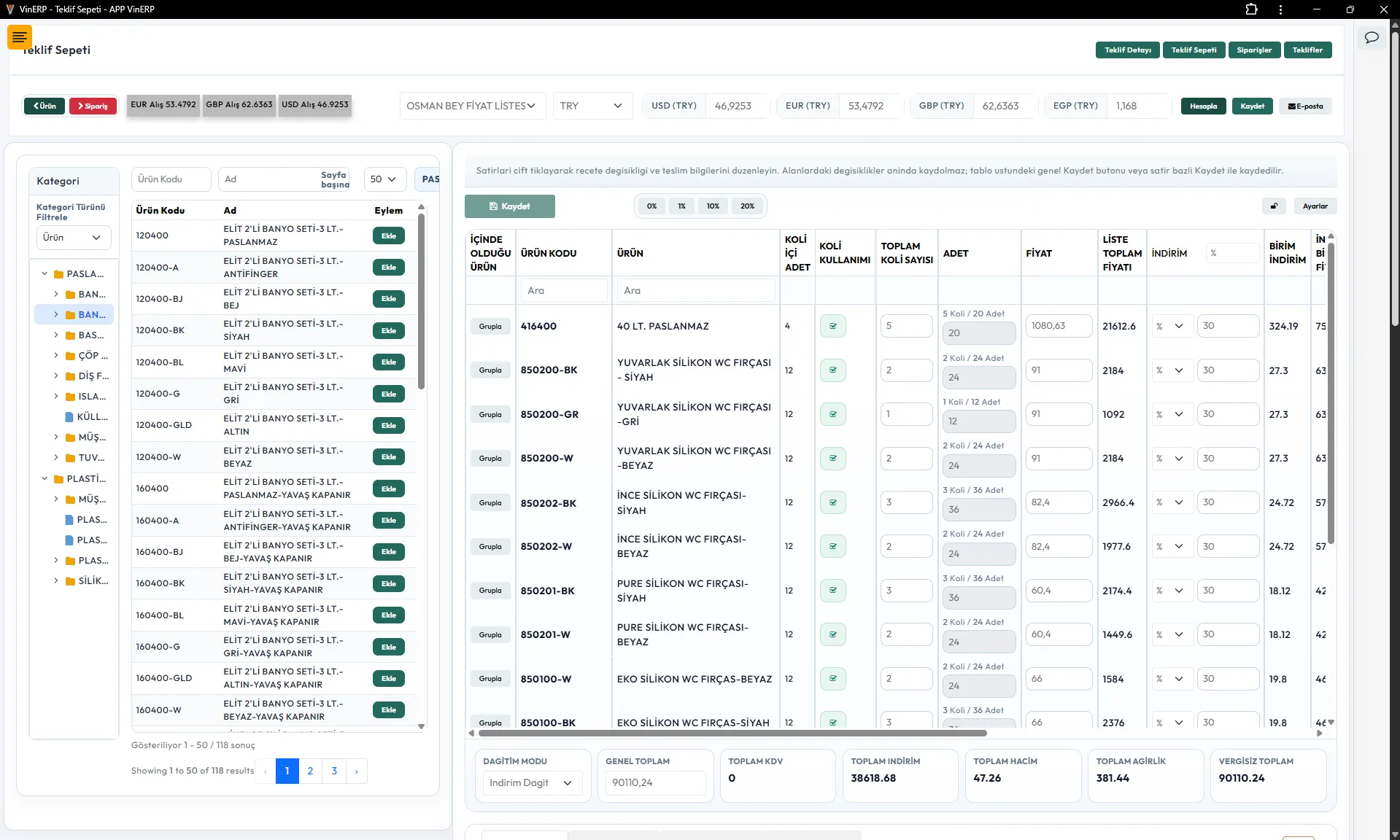
Manufacturing RFQ
Quote Management
Approval Workflow
Margin Control
BOM & Costing
ERP Integration
A Controlled RFQ-to-Order Workflow for Manufacturing Sales
This reference workflow demonstrates how a manufacturing company can move a customer request
from initial RFQ intake through technical validation, costing, pricing, quote revisions,
commercial approval and finally into an ERP-ready sales order.
The objective is not simply to generate a quotation PDF faster.
A reliable RFQ-to-order workflow must preserve the technical and commercial
decisions behind the quote: what the customer requested, which specifications were reviewed,
what materials and lead times were checked, how the price was calculated,
who approved exceptions and exactly which version the customer accepted.
When these stages are handled through email, spreadsheets and verbal approvals,
the final order may contain little evidence of how the commercial commitment was created.
A structured workflow turns that fragmented process into an auditable operational pipeline.
End-to-End RFQ-to-Order Flow
01
RFQ Intake
Capture customer demand.
→
02
Qualification
Decide whether to quote.
→
03
Technical Review
Validate specification.
→
04
Cost & Availability
Material and capacity checks.
→
05
Quote Draft
Build commercial offer.
→
06
Approval
Margin and exception control.
→
07
Customer Revision
Negotiate without losing history.
→
08
Accepted Quote
Freeze commercial commitment.
→
09
ERP Handoff
Create validated order data.
Why Manufacturing RFQs Need More Than a Standard Quote Form
In straightforward transactional sales, a salesperson can select a product,
choose a quantity and send a price.
Manufacturing RFQs are often very different.
A request may depend on drawings, dimensions, materials, tolerances,
packaging requirements, quantity breaks, production methods, tooling,
customer-specific specifications, delivery dates and special commercial terms.
Some products already exist in the ERP; others must be configured,
modified or evaluated before they can even be priced.
Technical Uncertainty
Sales may not be able to determine manufacturability,
material requirements or production routing without engineering input.
Commercial Uncertainty
Margin depends on cost, quantity, delivery commitment,
customer agreement, currency and production assumptions.
Multiple Stakeholders
Sales, engineering, production, purchasing and finance may all
need to contribute before the quote becomes commercially safe.
Repeated Revision
Quantity, specification, delivery or pricing may change several times
before the customer accepts the final offer.
1. Structured RFQ Intake
RFQ automation starts by replacing unstructured requests with a consistent intake model.
Email may remain one channel through which a request arrives, but the operational record
should live inside the RFQ system.
Every RFQ should receive a stable reference and preserve the original customer requirement
before technical or commercial assumptions begin changing it.
| RFQ Data |
Examples |
Why It Matters |
|
Customer context
|
Account, buyer, delivery location, opportunity
|
Connect the request to CRM history and commercial agreements
|
|
Requested item
|
Item code, description, custom part or specification
|
Establish what is actually being requested
|
|
Quantity
|
Annual volume, batch size, quantity breaks
|
Drives costing, capacity and pricing
|
|
Technical inputs
|
Drawing, BOM, material, tolerance, revision
|
Gives engineering an explicit review scope
|
|
Commercial inputs
|
Target price, currency, payment terms
|
Makes customer expectations visible before pricing
|
|
Timing
|
Quote deadline and required delivery date
|
Separates quotation urgency from production feasibility
|
2. Qualification Before Engineering Effort Is Consumed
Not every incoming request should immediately consume engineering,
purchasing and costing resources.
A qualification gate can determine whether the RFQ is complete enough
and commercially relevant enough to enter technical review.
Is the requested specification sufficiently clear?
Is the requested quantity commercially meaningful?
Is the requested delivery expectation realistic enough for review?
Does the request fit available manufacturing capabilities?
Is required customer, product or compliance information missing?
Who owns the next action if additional information is required?
3. Technical Review and BOM Validation
The technical review turns a commercial request into a manufacturable definition.
This is where engineering verifies whether the requested product can be produced
under the stated specification and identifies any missing or conflicting information.
Drawing & Revision Control
Associate the reviewed drawing or specification revision with the RFQ
so later quote versions cannot silently reference a different technical baseline.
BOM Validation
Determine required raw materials, semi-finished items,
purchased components and packaging requirements.
Manufacturing Route
Identify significant production stages, machine requirements,
tooling needs or outsourced operations.
Quality Requirements
Capture inspection, testing, documentation and certification obligations
that may affect cost or lead time.
Technical Exceptions
Record deviations or assumptions explicitly instead of allowing them
to exist only in engineering conversations.
Technical Approval
Mark the technical baseline approved for costing before the commercial quote is built.
4. Cost, Lead-Time and Availability Checks
Costing should use the approved technical interpretation of the RFQ.
The objective is to establish a defensible commercial baseline rather than
allowing the salesperson to work backwards from a desired customer price.
| Cost Driver |
Possible Source |
RFQ Decision |
|
Raw materials
|
ERP inventory / procurement
|
Existing cost, current supply or new purchasing requirement
|
|
Purchased components
|
Supplier quotations / purchase history
|
Supplier price and expected delivery
|
|
Production
|
Routing / machine / labor standards
|
Expected processing cost and capacity impact
|
|
Tooling
|
Engineering / procurement
|
One-time charge, amortization or customer-owned tooling
|
|
Packaging & logistics
|
Product master / logistics
|
Commercial delivery basis and additional cost
|
|
Currency exposure
|
Finance / ERP
|
Quote currency, exchange assumptions and validity period
|
Cost Is Not the Same as Price
A strong RFQ workflow keeps cost calculation and sales pricing conceptually separate.
Cost describes the expected economic burden of fulfilling the requirement.
Price reflects the commercial decision offered to the customer.
Pricing can then consider customer agreements, quantity breaks, market strategy,
minimum margin, currency, payment terms and negotiated exceptions without destroying
the original costing evidence.
For deeper pricing governance, see
Pricing & Quoting
.
5. Quote Creation as a Versioned Commercial Record
A quotation should be more than a generated PDF.
The PDF is an output; the quote record is the commercial source of truth.
Line items, quantities, unit prices, discounts, currency, taxes,
payment terms, delivery assumptions and validity dates should remain structured
so they can later be analyzed, approved and converted into an order.
Structured Quote Lines
- Product or configured item reference
- Customer item reference where required
- Quantity and unit of measure
- Unit price and currency
- Discount and reason code
- Expected delivery or lead time
- Technical revision reference
Quote Header
- Quote number and revision
- Customer and account
- RFQ reference
- Issue and expiration dates
- Payment and delivery terms
- Commercial notes
- Approval status
Quote Version Control: Never Overwrite the History
Manufacturing quotations frequently change before acceptance.
The customer may request a different quantity, specification,
delivery date, payment term or commercial price.
Editing the existing record in place destroys negotiation history.
Instead, a new quote revision should preserve its relationship with
the previous version while keeping the earlier commercial commitment immutable.
Revision 1
Original Offer
Revision 2
Quantity Changed
Revision 3
Price Negotiated
Revision 4
Customer Accepted
6. Margin, Discount and Commercial Approval Matrix
Approval should be driven by policy, not by manually deciding who needs to approve
each quotation.
Standard quotes that remain inside approved commercial boundaries should move quickly.
Only exceptions should create additional approval work.
| Condition |
Example Rule |
Approval Route |
|
Standard commercial quote
|
Inside configured margin and payment policy
|
No additional approval
|
|
Discount exception
|
Discount exceeds salesperson authority
|
Sales manager
|
|
Margin exception
|
Margin falls below configured threshold
|
Commercial / finance approval
|
|
Extended payment terms
|
Terms exceed customer or policy baseline
|
Finance / credit owner
|
|
Delivery risk
|
Requested date conflicts with current production assessment
|
Operations approval
|
|
Technical deviation
|
Quote contains a controlled deviation from requested specification
|
Engineering approval
|
Approvers Need Decision Context, Not Just an Approve Button
An approval request is only useful when the approver can understand what changed
and why the exception exists.
Previous vs Proposed Price
Delivery and Operational Risk
7. Customer Revision and Negotiation Loop
Sending the first quote does not end the RFQ workflow.
It begins the negotiation stage.
Customer responses should be classified instead of disappearing inside an email thread.
The workflow should distinguish acceptance, rejection, clarification requests
and renegotiation because each outcome requires a different next action.
Accept
Move toward order conversion.
Renegotiate
Create a new controlled quote revision.
Clarification
Return to technical or commercial review without losing context.
Reject / Lost
Preserve loss reason and commercial intelligence.
8. Freeze the Accepted Commercial Commitment
Once a customer accepts a quotation, the accepted revision should become a stable commercial record.
The ERP order must not be built from a quote that sales can continue editing afterward.
Acceptance Snapshot
Accepted quantities and prices
Technical revision or configuration
Payment and delivery terms
Approval chain and decision history
Customer acceptance evidence
9. ERP-Ready Order Handoff
The accepted quotation should produce a structured order handoff rather than requiring
operations staff to retype the quote into the ERP.
This is where RFQ automation becomes operationally valuable.
The commercial workflow has already collected and validated most of the information
required to create the order.
| Order Domain |
Handoff Data |
|
Customer
|
ERP customer ID, billing account, ship-to location
|
|
Commercial
|
Currency, payment terms, pricing basis, approved discount
|
|
Lines
|
Item/configuration, quantity, UoM, unit price and delivery requirement
|
|
Technical
|
Approved drawing, recipe, BOM or configuration reference where required
|
|
Traceability
|
RFQ ID, accepted quote ID and accepted revision
|
CRM and ERP Ownership Should Remain Explicit
RFQ automation should not duplicate every ERP function inside the sales application.
Instead, each system should retain ownership of the data it can govern reliably.
| Domain |
Likely Owner |
RFQ Workflow Responsibility |
|
Account relationship
|
CRM
|
Customer context, contacts and opportunity history
|
|
Item master
|
ERP / PIM
|
Read authoritative product and item references
|
|
Inventory
|
ERP / WMS
|
Consume availability signals without creating shadow stock
|
|
RFQ and quote revision
|
CRM / Quoting layer
|
Own negotiation, revision and approval workflow
|
|
Final sales order
|
ERP
|
Commit approved commercial data into execution
|
See
CRM–ERP Integration
for the broader system-of-record, API and synchronization architecture.
ERP Order Creation Must Be Idempotent and Reconciled
A timeout during ERP order creation does not necessarily mean the order failed.
Retrying blindly can create duplicate customer orders.
A production-grade integration should use a stable handoff identifier,
validate the payload before submission and reconcile the response with the ERP
before declaring order creation successful.
Idempotency Key
Prevent duplicate order creation from repeated submissions.
Validation
Reject incomplete or stale order data before ERP submission.
Retry Policy
Retry only failures that are safe to retry.
Reconciliation
Verify the ERP order number and accepted state before closing the handoff.
RFQ State Machine
Explicit states make ownership and automation rules predictable.
A practical implementation can use a state model similar to the following,
adjusted to the company's actual process.
| State |
Primary Owner |
Exit Condition |
|
New RFQ
|
Sales |
Minimum intake data complete |
|
Qualification
|
Sales |
Proceed, request information or decline |
|
Technical Review
|
Engineering |
Technical baseline approved |
|
Costing
|
Operations / Costing |
Cost and lead-time inputs complete |
|
Quote Draft
|
Sales |
Commercial offer prepared |
|
Pending Approval
|
Configured approver |
All required approvals complete |
|
Sent to Customer
|
Sales |
Customer response received or quote expires |
|
Revision Required
|
Sales / Technical |
New controlled revision prepared |
|
Accepted
|
Sales |
Acceptance evidence and final validation complete |
|
ERP Handoff
|
Integration / Operations |
ERP order creation reconciled |
|
Converted to Order
|
ERP / Operations |
ERP owns downstream execution |
Role-Based Responsibilities
RFQ automation works best when the system makes responsibility explicit instead of
treating every participant as an unrestricted administrator.
Sales
Customer context, RFQ intake, quote preparation, negotiation and customer communication.
Engineering
Technical feasibility, specifications, BOM, drawings and technical exceptions.
Purchasing
External material pricing, supplier availability and procurement lead-time input.
Operations
Capacity, production feasibility and delivery commitment review.
Finance / Management
Margin, payment terms, credit and policy exceptions.
Integration Layer
Validate accepted quote data and coordinate reliable ERP order creation.
Auditability Should Be Built Into Every State Change
The workflow should answer not only what the current quote looks like,
but how it reached that state.
Which cost baseline was used?
Why was an exception requested?
Who approved the exception?
Which version did the customer accept?
Exception Handling Is Part of the Workflow
Real manufacturing RFQs rarely follow the happy path every time.
The application should model exceptions as explicit workflow outcomes.
Customer Information Missing
Pause the RFQ with a defined owner and required information list
instead of allowing it to remain silently incomplete.
Material Not Available
Route the requirement through purchasing or request an approved substitution.
Lead Time Cannot Be Met
Expose the operational conflict before the customer receives an unrealistic commitment.
Margin Below Policy
Require explicit approval rather than silently allowing unauthorized pricing.
Quote Expired
Revalidate cost, price and availability instead of converting stale commercial terms into an order.
ERP Handoff Failed
Keep the accepted quote intact, expose the integration error and reconcile before retrying.
RFQ Workflow KPIs
Once the workflow is structured, management can measure where quotes actually slow down
and which types of requests consume the most effort.
RFQ-to-Quote Cycle Time
Time between RFQ receipt and first approved quote.
Technical Review Time
Time spent waiting for or performing technical validation.
Approval Cycle Time
Time consumed by commercial exception approvals.
Revision Count
Number of quote versions required before customer decision.
Quote Win Rate
Accepted quotes relative to completed quotations.
Margin Exception Rate
Frequency of quotes requiring approval outside commercial policy.
Lost RFQ Reasons
Price, delivery, technical fit, no decision or other structured outcomes.
Order Handoff Failures
Accepted quotes that require intervention before ERP order creation.
Quote Expiration Rate
Quotations that reach expiry without a customer decision.
Reference Architecture
Layer 1
CRM / RFQ Intake
Customer context, request capture, opportunities and communication.
Layer 2
Technical Workflow
Specifications, BOM, drawings, feasibility and engineering approvals.
Layer 3
CPQ / Quoting
Costing, pricing, quote versions, margins and approval policy.
Layer 4
Integration Layer
Validation, mapping, idempotency, retry, reconciliation and logs.
Layer 5
ERP Execution
Sales order, production, procurement, shipment, invoice and fulfilment.
Practical Implementation Roadmap
RFQ automation should normally be implemented in stages.
Trying to automate every exception before the core workflow is stable often creates unnecessary complexity.
1
Map the Existing RFQ Workflow
Document current states, owners, spreadsheets, approvals,
technical checks and ERP handoffs before designing software screens.
2
Define State Ownership and Required Data
Define what must exist before an RFQ can leave each state
and which role owns that transition.
3
Build RFQ and Quote Versioning
Establish structured intake, technical review,
quote lines and immutable revision history.
4
Introduce Approval Policy
Route only true pricing, margin, payment,
delivery and technical exceptions to additional approval.
5
Connect ERP Read Models
Bring product, customer, cost, inventory and lead-time signals
into the quoting workflow without duplicating ERP ownership.
6
Automate Accepted Quote-to-Order Handoff
Validate accepted commercial data, create the ERP order through a reliable contract
and reconcile the resulting ERP reference.
The Goal Is Not Faster PDFs. It Is a Better Commercial Operating Model.
A mature RFQ-to-order workflow gives sales teams speed without removing control.
Engineering can see exactly what needs review.
Operations can challenge unrealistic lead times before they become customer commitments.
Finance can protect margin without manually reviewing every normal quotation.
Most importantly, an accepted quotation becomes structured operational data
instead of an attachment that someone must manually interpret and re-enter into the ERP.
The same foundation can later expand into full
quote-to-cash automation, linking the approved order with production,
procurement, fulfilment, invoice status, collections and repeat-order workflows.