Quick context
“Procure-to-pay” (P2P) covers the lifecycle from request to payment—typically including requisitions, supplier engagement,
purchase orders, receipt, invoice processing, and payment execution. When P2P is weak, manufacturing and wholesale teams
feel it as stockouts, rushed buying, pricing leakage, and invoice disputes. :contentReference[oaicite:0]{index=0}
Why procurement breaks at scale (and what it looks like day-to-day)
Most organisations don’t need “more purchasing.” They need repeatable control:
clear ownership, consistent approvals, and a single source of truth for supplier decisions.
- Shadow buying: purchases made outside policy because the process is too slow.
- RFQ chaos: quotes scattered in inboxes; no comparability, no history.
- Approval ambiguity: unclear limits and exceptions, leading to escalation loops.
- Receipt gaps: goods received but not recorded accurately, causing inventory drift.
- Invoice mismatch: PO, receipt, and invoice don’t align—resulting in rework and delays.
Manufacturing & wholesale reality check
In manufacturing and wholesale procurement, the cost of “messy P2P” is amplified:
long lead times, MOQ constraints, spec compliance, and supplier variability mean small process failures become operational incidents.
A procurement ERP must handle exceptions without turning every exception into a manual firefight.
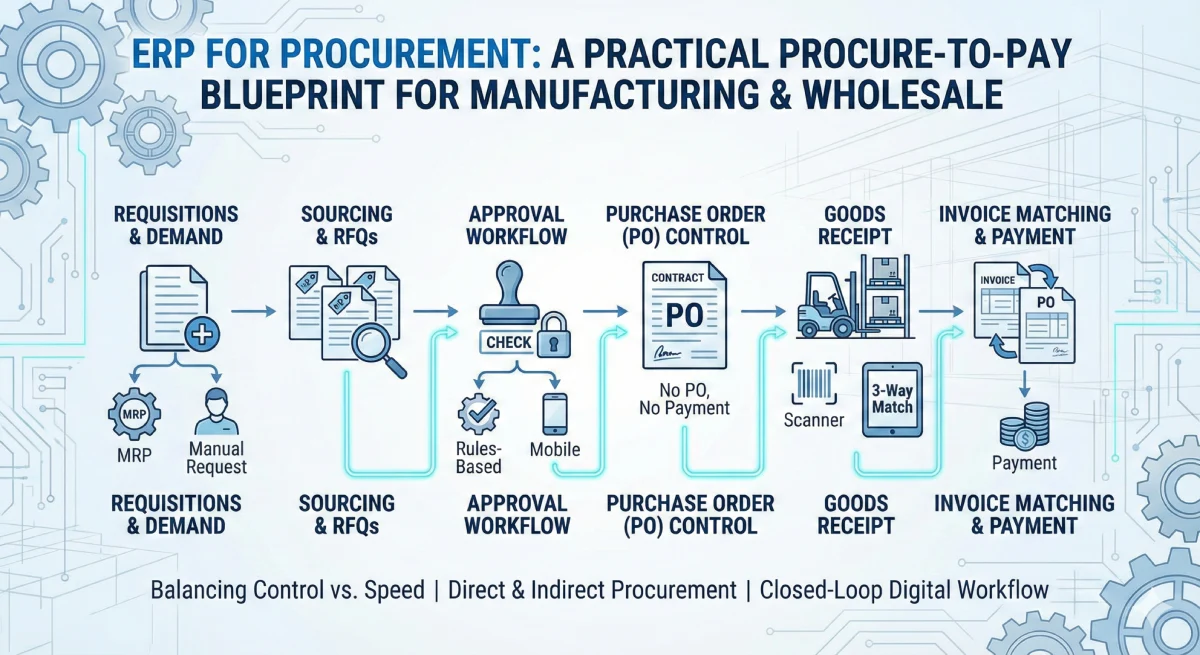
Procure-to-pay, simplified: an 8-stage operating model
Treat procurement like a product: define stages, enforce standards, and measure throughput. Below is a practical model you can
implement in a custom ERP (or retrofit onto an existing stack).
-
1) Demand signal
Reorder points, MRP suggestions, sales-driven demand, or project-based requests.
-
2) Requisition (PR)
A structured request: what, why, by when, budget owner, and supporting context.
-
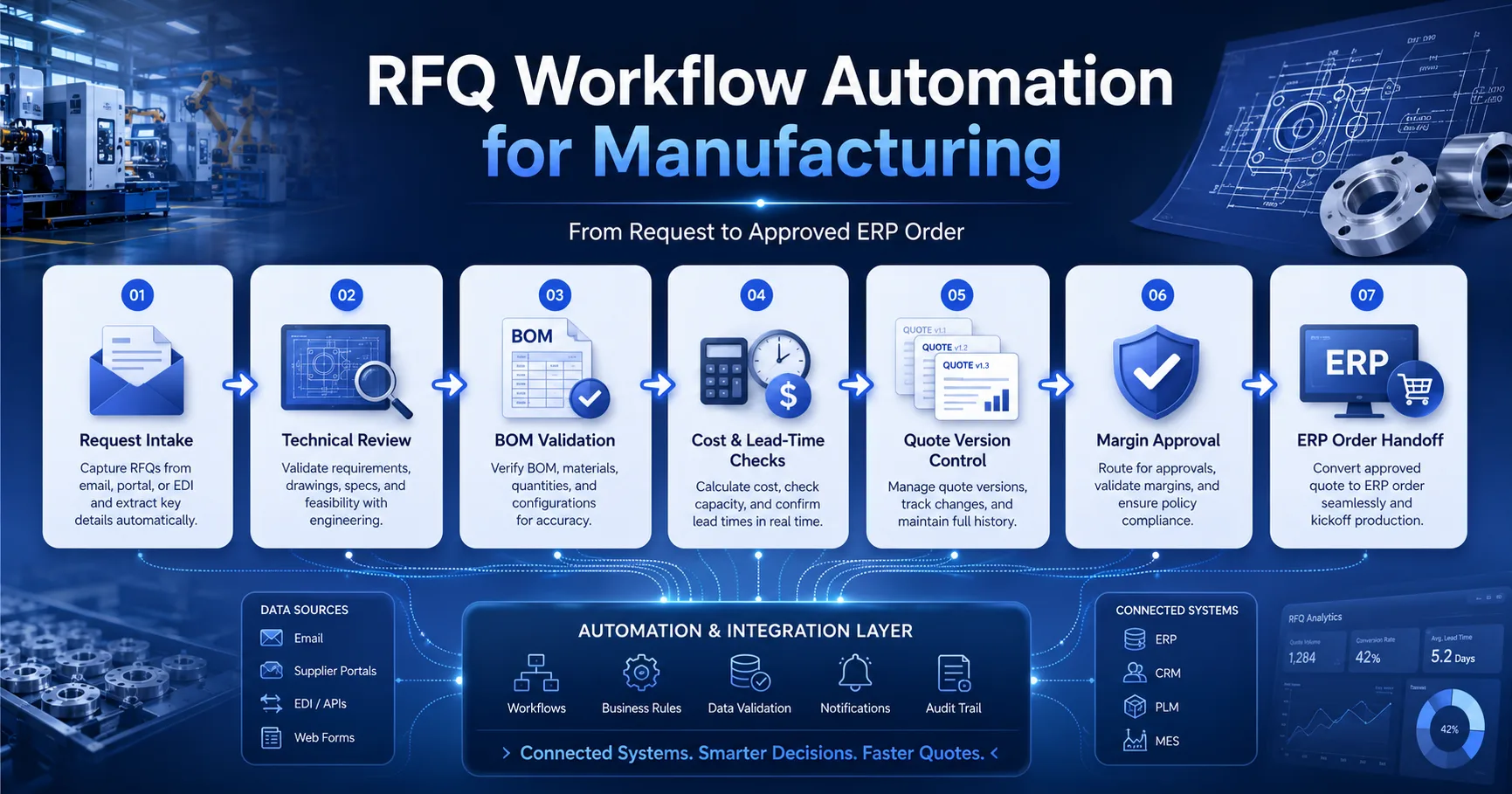
3) RFQ / supplier engagement
Standardised quote requests with comparable fields, deadlines, and spec attachments.
-
4) Quote evaluation
Side-by-side comparison: price, lead time, Incoterms, warranty, and supplier risk.
-
5) Purchase Order (PO)
Approved commitment with version control, terms, and delivery schedule.
-
6) Receipt (GRN) & quality
What arrived, when, and whether it passed inspection—captured in the system.
-
7) Invoice processing & matching
Match invoice against PO and receipt to prevent overbilling and duplicates.
-
8) Payment & supplier performance
Pay on terms; track OTIF, quality, dispute rates, and cycle time.
The control layer: approvals, limits, and audit trail (without slowing teams down)
A procurement ERP should reduce friction by making policy implicit. Instead of asking people
to “remember rules,” encode them into the workflow:
Approval matrix
Define approvals by amount, category, supplier type, and risk (e.g., new supplier vs approved supplier).
Exception paths
Emergency buys, partial shipments, substitutions, and price changes should follow predefined exception flows.
Role-based segregation
Separate “request,” “approve,” “order,” “receive,” and “pay” where required—especially for sensitive categories.
Audit trail by default
Every state change (PR → approved → PO → receipt → invoice → payment) should be timestamped and attributable.
Invoice matching: where real money is protected
Procurement isn’t finished when the PO is sent. A high-control P2P model prevents leakage at the invoice stage by using
matching rules—commonly known as two-way or three-way matching
(invoice vs PO vs receipt). This is a core control mechanism in many ERP stacks. :contentReference[oaicite:1]{index=1}
Practical matching rules to implement
- Tolerance bands: allow minor price/qty variance; route larger variance to approval.
- Receipt required: don’t pay for items that weren’t received (unless category allows).
- Duplicate detection: block invoices with same supplier + invoice number + amount.
- Partial invoice logic: handle staged deliveries and split invoices without manual spreadsheets.
Want a procurement workflow mapped to your operation?
If your team is scaling procurement across multiple warehouses, product lines, or suppliers, you’ll get better outcomes
by designing the operating model first—and then building the ERP around it.
A minimum viable data model (so you don’t rebuild later)
You don’t need a massive schema to start—but you do need the right primitives. Here’s a minimum model that supports
approvals, traceability, and matching without turning into “spreadsheet ERP.”
Core documents
- Requisition: requester, needed-by date, cost centre, reason, status
- RFQ: suppliers, spec pack, comparison fields, deadline, outcome
- Purchase Order: version, terms, schedule, approvals, currency
- Receipt (GRN): quantities, batch/serial, inspection status, notes
- Supplier Invoice: lines, taxes, matching results, exceptions
Control tables
- Approval policy: thresholds, category rules, exception routes
- Supplier master: status, risk flags, lead times, certifications
- Audit log: entity, change type, actor, timestamp, before/after
- Permissions: roles, permissions, scopes (site/warehouse/category)
30–90 day wins: automation that teams actually feel
If you want momentum, prioritise automations that remove repetitive work and prevent avoidable disputes.
- RFQ templates: consistent quote structure per category.
- Approval routing: auto-route by thresholds and exceptions.
- Supplier quote comparison: one screen, history preserved.
- Receipt capture: mobile-friendly GRN with inspection outcomes.
- Invoice matching: tolerance rules + exception queue.
- Spend visibility: category and supplier views for leadership.
KPIs that matter (without vanity reporting)
Track procurement like an operational system—cycle time, compliance, and exception rates. A lean KPI set is easier to maintain and
actually influences behaviour.
Cycle time
PR → PO, PO → receipt, invoice → payment.
Policy compliance
Percent of spend via approved flow vs exceptions.
Exception rate
Invoice mismatch volume, root cause categories.
Supplier performance
OTIF, quality failures, dispute frequency.
Common implementation pitfalls (and how to avoid them)
Pitfall: building screens before the operating model
If you don’t define stages, ownership, and approval rules up front, the system becomes a UI for confusion. Start with the
lifecycle and decision points first.
Pitfall: no exception design
Manufacturing procurement always has exceptions: substitutions, partial receipts, urgent buys. If exceptions aren’t designed,
people bypass the system and you lose control.
Pitfall: weak master data
Suppliers, items, units, and tax logic must be consistent. Otherwise invoice matching becomes noisy and reporting becomes unreliable.
FAQ (procurement ERP, approvals, and matching)
What’s the difference between two-way and three-way matching?
Two-way matching compares the invoice to the purchase order. Three-way matching adds the receipt (what was actually received),
which is stronger for preventing overbilling and paying for undelivered goods.
Do we need an RFQ module if we already email suppliers?
Email works until you need comparability, auditability, and history. An RFQ workflow standardises quote fields, preserves decisions,
and reduces negotiation leakage—especially when multiple buyers are involved.
What should we implement first for quick impact?
Start with approvals + PO control + receipt capture. Once those are stable, invoice matching becomes dramatically easier and you’ll
see fewer disputes and faster close cycles.
If procurement is mission-critical, treat it like a system—not a set of emails.
If you want a procurement ERP designed around your manufacturing or wholesale workflows—approvals, RFQs, PO control,
receipt discipline, and invoice matching—I can map the operating model and translate it into a buildable delivery plan.
Typical response time: within 24 hours • Clear scope & timeline • Documentation included